

Overview
Cekura can simulate calls against any voice agent that runs inside an Agora RTC channel. Cekura joins the channel as a participant over WebRTC and exchanges 16 kHz mono PCM audio with your agent, then transcribes the conversation and runs your evaluators against it. Unlike static credentials, the per-call join details (app id, channel, token, and optional encryption) are minted at run time by an endpoint you configure — they are fetched for each run and never stored by Cekura. Use Agora Simulations when:- Your agent joins an Agora channel and you mint short-lived join tokens per session.
- You want Cekura’s tester to converse with the agent directly in the channel.
- How to test — configure your agent and trigger runs from the dashboard or the API.
- Session endpoint contract — what your endpoint must return so Cekura can join.
- How to test
- Session endpoint contract
- Dashboard
- Code
1
Configure Agora credentials
Open your agent settings and pick Agora in the provider grid: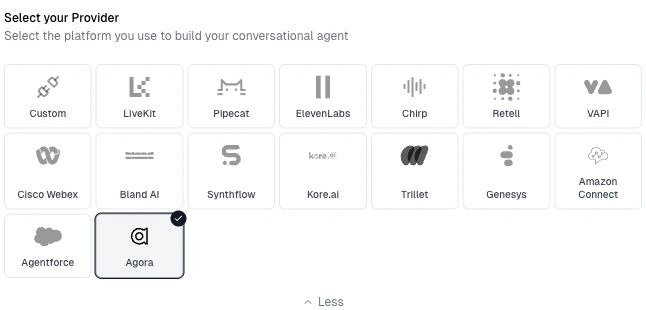
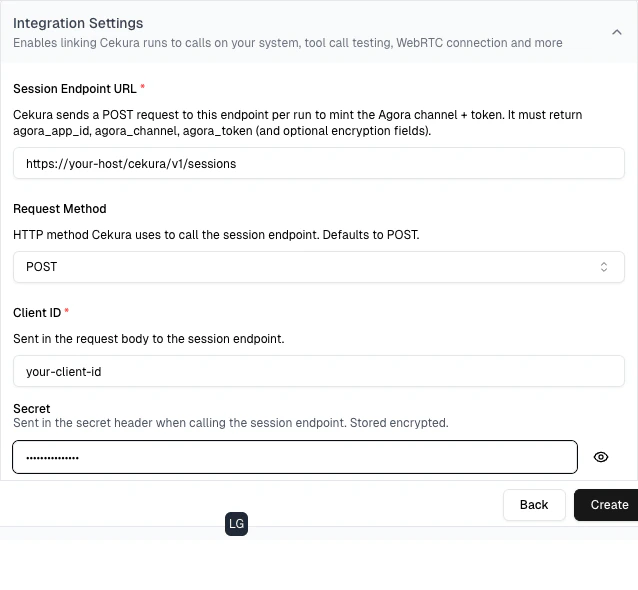
- Session Endpoint URL — the endpoint Cekura calls per run to mint the Agora channel + token (see Session endpoint contract).
- Client ID — sent in the request body as
{"client_id": "..."}. - Secret — sent in the auth header to your endpoint. Stored encrypted; write-only.
- Request Method —
POST(default) orGET. Cekura uses this verb when calling your session endpoint. - Secret Header Name — the header the secret is sent in. Defaults to
X-Cekura-Secret.
Your agent must be a live participant in the Agora channel the endpoint returns, exchanging raw
pcm_s16le audio at 16 kHz mono. See Session endpoint contract for the exact response shape.2
Run tests from the dashboard
- Select scenarios for your agent and click Run.
- With Agora configured, you will see a WebRTC option under VOICE in the Configure Run dialog.
- Select WebRTC and click Run.
- Call your session endpoint to fetch fresh join details (app id / channel / token / encryption).
- Join the Agora channel as a participant and converse with your agent.
- Capture the conversation, transcribe it, and run your evaluators against the result.
3
View results
Results appear in your dashboard like any other run — status, metrics, transcripts, and audio playback. The run type is shown as Agora.