

Overview
Learn how to create voicemail and IVR (Interactive Voice Response) scenarios in Cekura using Structured Tests. These powerful features allow you to build voicemail receivers and menu-driven phone systems that respond to DTMF tones.Voicemail
What is Voicemail?
Voicemail systems allow callers to leave messages when the recipient is unavailable. With Cekura, you can create intelligent voicemail receivers that guide callers through the message recording process using Structured Tests.How It Works
- The voicemail system greets the caller with a personalized message
- Prompts the caller to record their message
- Waits for a DTMF signal (e.g., pressing 0) to mark the end of the message
- Ends the call after message completion, signifying the recording was saved
Creating a Voicemail Scenario
Follow these steps to set up a voicemail system in Cekura:Step 1: Open Create Evaluator Form
Navigate to the evaluator creation form and click on “Create Evaluator” to begin setting up your voicemail scenario. Select Structured Tests as the evaluator type. Structured Tests allow you to define specific behaviors based on caller interactions.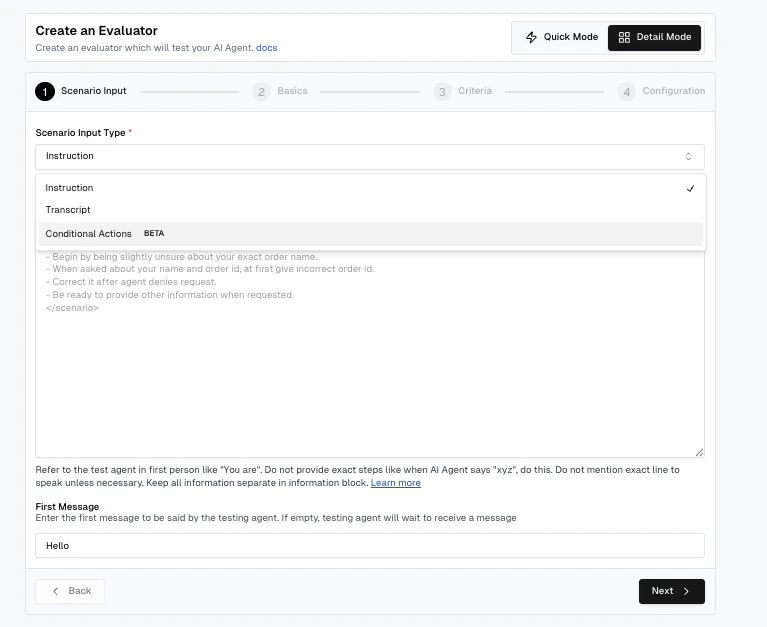
Step 2: Configure Voicemail Conditions
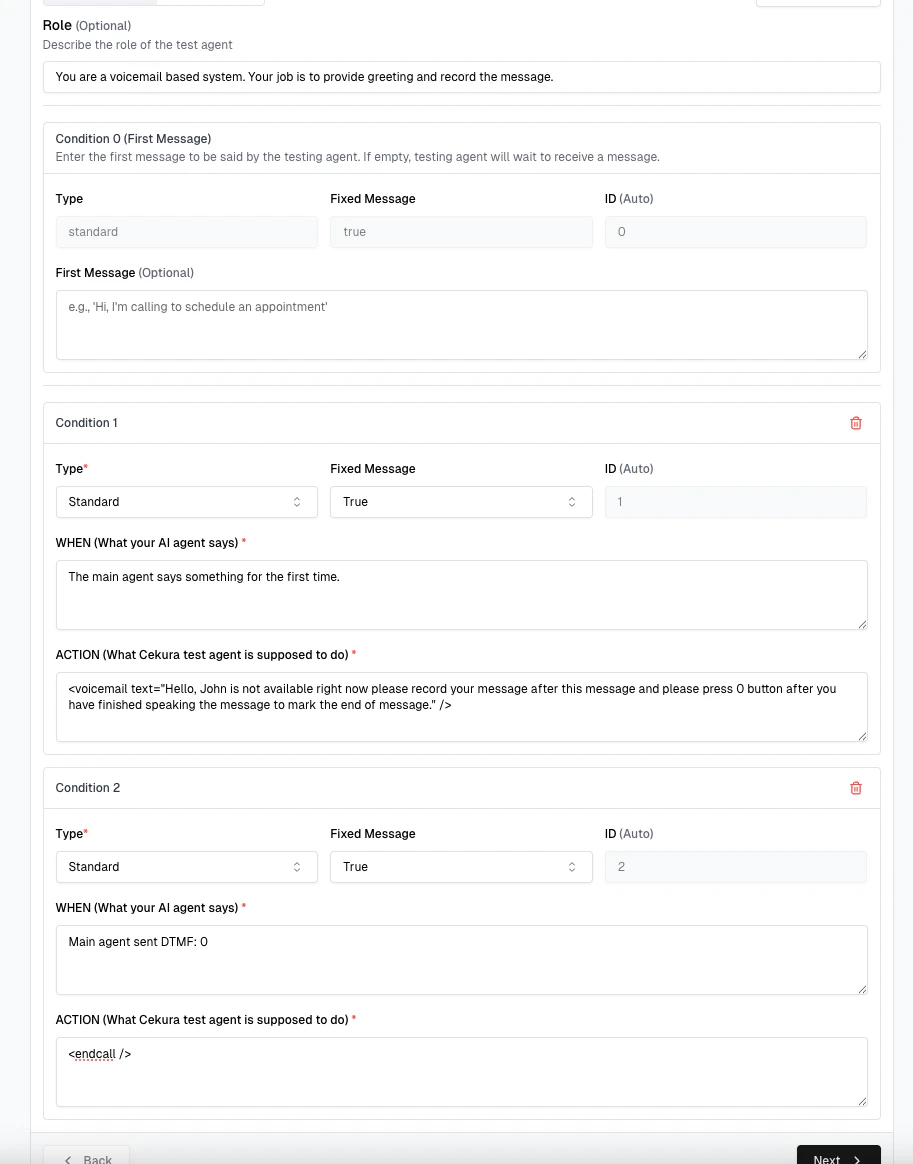
In the conditions configuration: First message: For voicemail scenarios where the main agent speaks first, leavefirst_message empty.
Condition 1 - Voicemail Greeting:
When the main agent starts the conversation, add a voicemail greeting using the <voicemail> XML tag with the following syntax:
<voicemail> only work in verbatim steps — don’t wrap the step in <ai_generated>.
Provider Support: The <voicemail> tag works with all TTS providers (Cartesia, ElevenLabs, etc.)
Condition 2 - End Call on DTMF:
When the main agent sends a DTMF tone of the digit you mentioned (e.g., 0), end the call using the <endcall /> tag. This simulates that the recording was saved successfully. This step must be verbatim as well.
Following is an example of how to do the same.
Step 3: Enable Receive DTMF
In the final step of evaluator creation, you need to enable the Receive DTMF toggle. This allows our testing agent to receive DTMF tones from the user agent side, which is essential for voicemail functionality since your agent needs to send dtmf tones to our testing agent. Enable the Receive DTMF toggle in the evaluator configuration as shown below: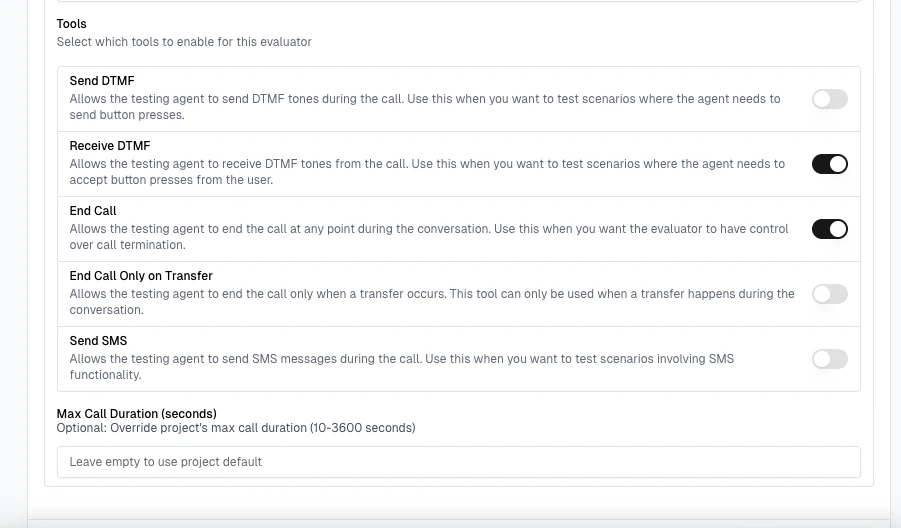
Complete Voicemail Configuration Example
Here’s a complete JSON configuration example for a personal voicemail system:- role: Defines the agent’s behavior as a voicemail receiver
- first_message: Empty, so the testing agent waits for the main agent to speak first
- conditions: Each pairs a trigger (
when) with what the testing agent says (say) - say: Spoken verbatim — required for XML tags (
<voicemail>,<endcall />). Wrap a step in<ai_generated>...</ai_generated>for a natural-language instruction instead
Key Voicemail Features
- Personalized Greetings: Custom messages for different recipients
- Message Recording: Capture caller messages automatically
- Completion Signals: Use DTMF tones to indicate message completion
- Automatic Call Termination: End call after message is recorded
- Structured Tests: Define specific behaviors based on caller interactions
Voicemail Best Practices
- Start with a clear greeting identifying the recipient
- Provide explicit instructions for leaving a message
- Specify how to end the message (e.g., “Press 0 when finished”)
- Keep the greeting brief and professional
- Ensure the Receive DTMF toggle is enabled for your evaluator
- Consider adding options for urgent messages or alternative contacts
- Test with different phone carriers to ensure compatibility
Voicemail Use Cases
- Personal voicemail boxes
- After-hours message collection
- Event registration confirmations
- Customer callback requests
- Survey response collection
- Automated appointment reminders with response capture
IVR (Interactive Voice Response)
What is IVR?
IVR systems provide menu-based navigation for phone calls, allowing callers to interact using keypad inputs (DTMF tones). With Cekura, you can create complex IVR flows using conditional scenarios and XML tags.How It Works
- The IVR system waits for DTMF tones from the caller
- Based on the received tone and current menu context, the system responds with the appropriate action
- Actions can include playing menu prompts or transitioning to natural conversation
Creating an IVR Scenario
Follow these steps to set up an IVR system in Cekura:Step 1: Create Evaluator with Structured Tests
Navigate to the evaluator creation form and select Structured Tests as the evaluator type, similar to the voicemail setup.Step 2: Configure IVR Menu Structure
Define your IVR menu flow using the first message and conditions:- First message: Set up the initial greeting and menu options
- DTMF-based conditions: Create conditions for each menu option based on DTMF tones
- Steps: Use
<ivr>XML tags for menu prompts or transition to natural conversation
Important: XML tags like
<ivr> only work in verbatim steps (the default). Wrap a step in <ai_generated>...</ai_generated> only when you want the agent to respond naturally without using XML tags.Step 3: Enable Receive DTMF
Just like voicemail, IVR systems require our testing agent to receive DTMF tones from the user agent side, since our bot acts as an IVR system. Enable the Receive DTMF toggle in the evaluator configuration. This feature works with all phone number providers, making it easy to set up IVR functionality.IVR Configuration Structure
IVR scenarios are configured using a JSON structure:Condition Object Structure
See Structured Tests for the full reference.
IVR XML Tags
Use the<ivr> XML tag to define menu prompts. The step must be verbatim (not <ai_generated>):
<ivr> tag works with all TTS providers (Cartesia, ElevenLabs, etc.)
Playing a Sequence Without Interruption
Use the<ignore_interruptions> block tag when a multi-part menu — pre-recorded clips, pauses, or spoken text — must play to completion no matter what the main agent says:
- Content goes between the opening and closing tags, never in an attribute. The tag protects a span, so normal text or tags can come before and after it, and it can appear more than once per step. Spans cannot nest.
- The main agent’s speech during the span is still transcribed and evaluated — it just never interrupts playback or triggers a reply.
- The
<audio>ids come from the audio-upload flow; don’t write them by hand. - The step must be verbatim, like all XML tags.
Example: Hospital IVR System
Key IVR Features
- Menu-Based Navigation: Guide callers through structured menus
- DTMF Detection: Respond to keypad inputs (0-9, *, #)
- Context-Aware Routing: Different actions based on previous menu selections
- Hybrid Mode: Mix IVR menus with natural conversation (wrap a step in
<ai_generated>)
IVR Best Practices
- Keep menu options concise (3-4 options per menu level)
- Provide clear instructions for navigation
- Always include an option to return to the main menu
- Offer an escape to natural conversation when needed
- Use consistent DTMF patterns (e.g., 9 for main menu, 0 for operator)
- Ensure the Receive DTMF toggle is enabled for your evaluator
- Test menu flows thoroughly before deployment
IVR Use Cases
- Customer support routing
- Hospital/healthcare information systems
- Appointment scheduling
- Order status inquiries
- Department directory navigation
- Multi-level menu systems for large organizations
Next Steps
After configuring your voicemail or IVR scenario:- Test thoroughly with different DTMF sequences
- Monitor call transcripts for user behavior patterns
- Refine menu structures and prompts based on usage data
- Ensure proper error handling for invalid inputs
- Update prompts for clarity and efficiency