

For the canonical reference of
{{...}} variables you can use in your metric prompts — and which are available in Simulation vs. Observability — see Metric Variables.What You Can Evaluate
LLM Judge Metrics are ideal for evaluating qualitative aspects of conversations that require understanding context and nuance:- Workflow Compliance: Check if agents followed specific steps or procedures
- Communication Quality: Assess tone, clarity, professionalism, or empathy
- Information Accuracy: Verify agents provided correct information or asked required questions
- Customer Handling: Evaluate objection handling, de-escalation, or problem resolution
- Policy Adherence: Ensure agents stayed within company policies and guidelines
- Call Outcomes: Determine if desired outcomes were achieved (bookings, resolutions, etc.)
Benefits
- No Coding Required: Write evaluations in natural language, no programming skills needed
- Flexible & Adaptable: Easily modify criteria by updating your metric description
- Context-Aware: Understands conversational context, not just keyword matching
- Dynamic Variables: Use call-specific data (customer info, metadata) in your evaluations
Creating LLM Judge Metrics
Navigate to the Metrics section and select Create Metric.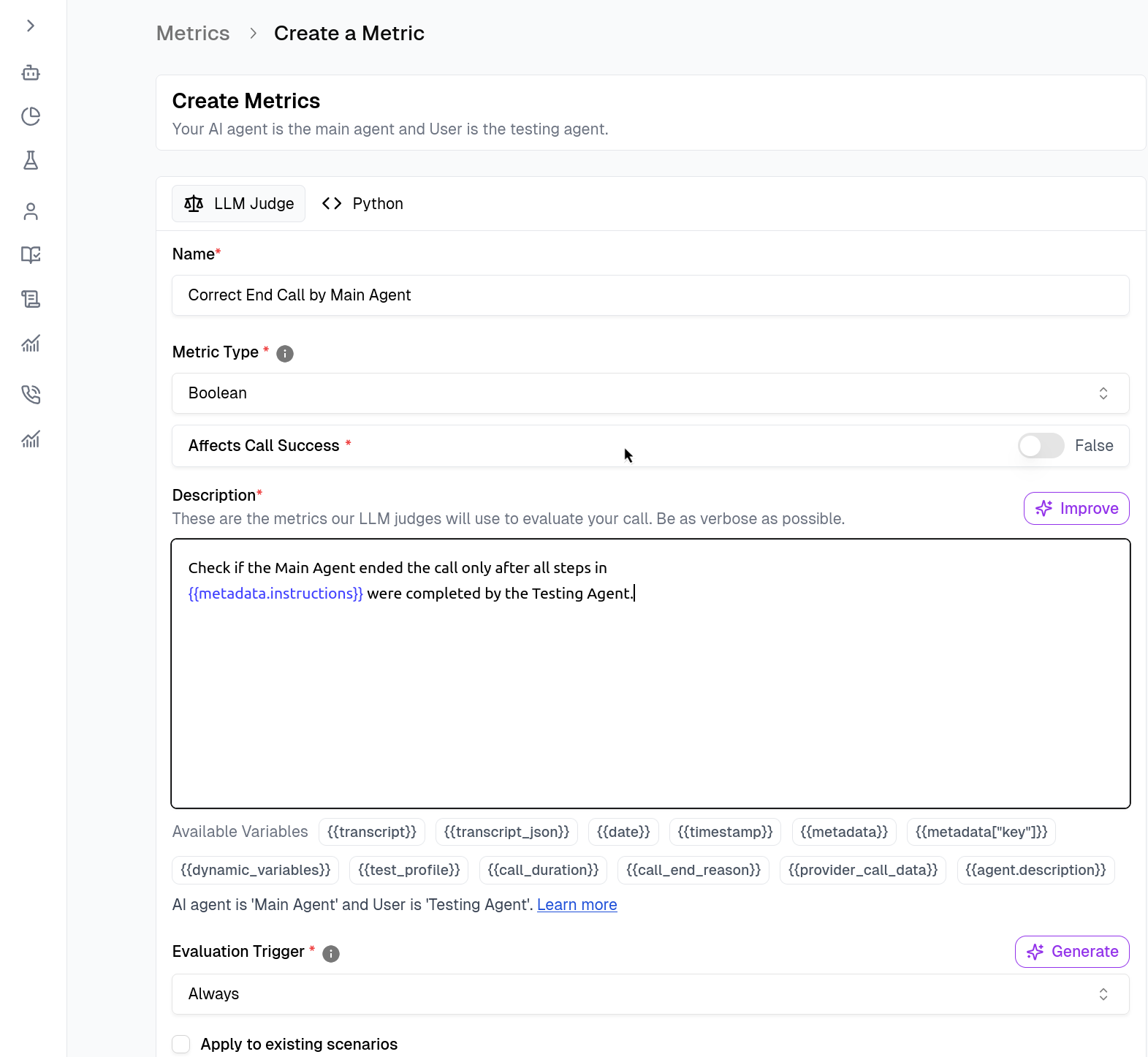
- Name & Type: Give your metric a descriptive name (e.g.,
Correct End Call by Main Agent). - Description (The Prompt): Write a natural language description of what constitutes success. This is what the LLM Judge will use to evaluate calls.
Use Voice Recording
Off by default — the judge reads the transcript. Turn it on only for criteria the transcript cannot answer, such as tone, pace, silence, or voicemail detection. It costs extra; see Audio Evaluation.Set Triggers
Define when the metric should run under the Evaluation Trigger section.- Always: Runs on every call (default).
- Custom: Use logic to run metrics only in specific scenarios. You can write a trigger prompt in natural language, or write Python code that decides when the metric should run. Trigger code receives the same
datadictionary as a Python metric and sets_result(a bool —Trueto run,Falseto skip) and_explanation. See Evaluation Trigger (Custom Code) for the contract and an example.
Testing Your Metrics
Before saving, validate your logic immediately within the builder.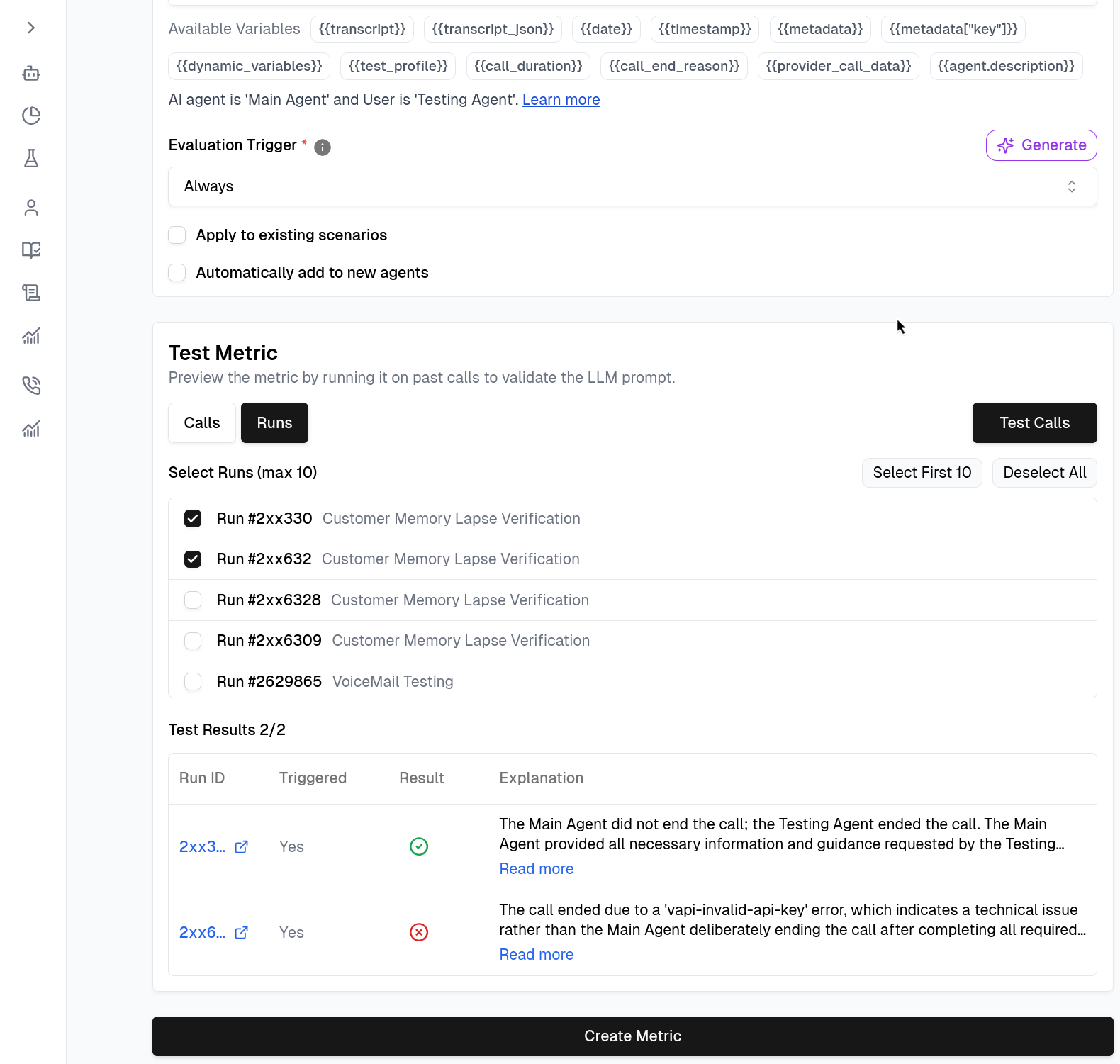
1
Click Test Metric
Navigate to the test section within the metric builder.
2
Select Call IDs
Select a few past Call IDs from the list to test against.
3
Run the Test
Run the test to see if the metric passes/fails as expected on historical data.
4
Create Metric
If satisfied with the results, click Create Metric to save.
Audio Evaluation
Some things cannot be judged from transcript text at all — tone, pace, empathy, talking over the caller, dead air, hold music, voicemail and answering-machine detection, pronunciation, or who is actually speaking. For these the judge has to listen to the recording, not read the transcript.Enable voice recording on the metric
Turn on Use voice recording — the toggle sits just above the Description on the metric form — and the judge analyzes the call’s audio alongside the transcript. Write the description in terms of what to listen for:A metric with voice recording enabled analyzes the whole call. To judge only
part of a call, you need a Python metric — see below. Build with
AI will also turn this
setting on by itself when your description names an audio-only phenomenon, and
tell you it did.
From Python code
When calling LLM Judge metrics from Python code, setaudio=True to have the judge analyze the actual voice recording instead of (or in addition to) the transcript text. Python metrics can additionally window the audio to a time range:
Related Documentation
- Build a Metric with AI - Refine this description with an AI agent, quickly or against your real calls and runs
- Metric Variables - Variables you can use in metric descriptions
- Creating Good Metrics - Complete guide for building high-fidelity metrics
- Python Metric - Write custom evaluation logic in Python, including audio-based evaluation
- Pre-defined Metrics - Generic metrics provided by Cekura