

Overview
When creating custom metrics, you can use variables from call data using the{{variable_name}} syntax. These variables come from different sources depending on the context.
Quick Reference
| Variable | Simulation | Observability |
|---|---|---|
{{transcript}} | ✅ | ✅ |
{{call_end_reason}} | ✅ | ✅ |
{{date}} | ✅ | ✅ |
{{timestamp}} | ✅ | ✅ |
{{metadata.*}} | ✅ | ❌ |
{{dynamic_variables.*}} | ❌ | ✅ |
{{test_profile.*}} | ✅ | ❌ |
{{provider_call_data.*}} | ✅ | ❌ |
{{agent.*}} | ✅ | ✅ |
Available Variables
System Variables
These variables are available in both Simulation and Observability calls:{{transcript}}
Availability: ✅ Simulation & Observability
Full conversation transcript as plain text.
Example value:
{{call_end_reason}}
Availability: ✅ Simulation & Observability
Reason why the call ended.
Common end reasons:
"assistant-ended-call""customer-ended-call""customer-did-not-answer""customer-busy""silence-timed-out""exceeded-max-duration""run-cancelled-by-user"
{{date}}
Availability: ✅ Simulation & Observability
Current date in YYYY-MM-DD format.
Example values:
"2024-12-13""2025-01-15"
{{timestamp}}
Availability: ✅ Simulation & Observability
Call’s timestamp in ISO 8601 format, including date, time, and timezone information.
Format: ISO 8601 (YYYY-MM-DDTHH:MM:SS.ffffff±HH:MM)
Example values:
"2024-12-13T14:30:45.123456+00:00""2025-01-15T09:15:30.789012-05:00"
{{provider_call_id}}
Availability: ✅ Simulation | ❌ Observability
Provider-specific call identifier from the telephony provider (e.g., Vapi, Retell).
Note: This value is only available when a provider call has been successfully matched and linked to the simulation run.
Example value:
"provider-call-id"
Namespace Variables
{{agent.*}}
Availability: ✅ Simulation & Observability
Access agent configuration details using the agent. prefix.
Available fields:
| Field | Description | Example Value |
|---|---|---|
{{agent.description}} | Description of the agent | "Customer support agent for handling inquiries" |
{{agent.name}} | Name of the agent | "Customer Support Agent", "Sales Agent" |
{{agent.language}} | Agent’s language code | "en", "es", "fr" |
{{agent.inbound}} | Whether agent handles inbound calls | true, false |
{{agent.contact_number}} | Agent’s phone number | "+1234567890" |
{{metadata.*}}
Availability: ✅ Simulation | ❌ Observability
Access metadata fields using the metadata. prefix.
Available fields:
| Field | Description | Example Value |
|---|---|---|
{{metadata.ringing_duration}} | Time before call answered (seconds) | 1.2, 3.5 |
{{metadata.call_end_reason}} | Same as {{call_end_reason}} | "customer-ended-call", "agent-ended-call" |
{{test_profile.*}}
Availability: ✅ Simulation | ❌ Observability
Structured test scenario data configured for simulation runs. Supports nested objects and array access for complex test scenarios.
Common fields:
| Field | Description | Example Value |
|---|---|---|
{{test_profile.patient_name}} | Patient name | "John Smith" |
{{test_profile.patient_id}} | Patient ID | "PT-001" |
{{test_profile.account_id}} | Account identifier | "ACC-456" |
{{test_profile.customer_name}} | Customer name | "Alice Johnson" |
{{provider_call_data.*}}
Availability: ✅ Simulation | ❌ Observability
This is based on the provider you have integrated on the platform. This variable gives you complete access to call details from your provider platform.
Example providers: VAPI, Retell, Elevenlabs, etc.
{{dynamic_variables.*}}
Availability: ❌ Simulation | ✅ Observability (via API)
Custom variables you pass via API to personalize the agent’s behavior during the call. These are user-defined fields you send when creating a call.
Common examples:
| Field | Description | Example Value |
|---|---|---|
{{dynamic_variables.user_name}} | Customer name | "John Doe" |
{{dynamic_variables.customer_name}} | Customer full name | "Jane Smith" |
{{dynamic_variables.order_number}} | Order or ticket ID | "ORD-12345" |
{{dynamic_variables.appointment_date}} | Scheduled date/time | "2024-01-15", "Jan 15, 2pm" |
{{dynamic_variables.total_amount}} | Transaction amount | "99.99", 150.00 |
{{dynamic_variables.account_id}} | Account identifier | "ACC-789" |
{{dynamic_variables.product_name}} | Product name | "Premium Plan" |
| Custom fields | Any custom field you define | Any value |
Using Variables in Metrics
When creating metrics, you can reference these variables directly in your metric configuration. Here’s how it looks in the interface: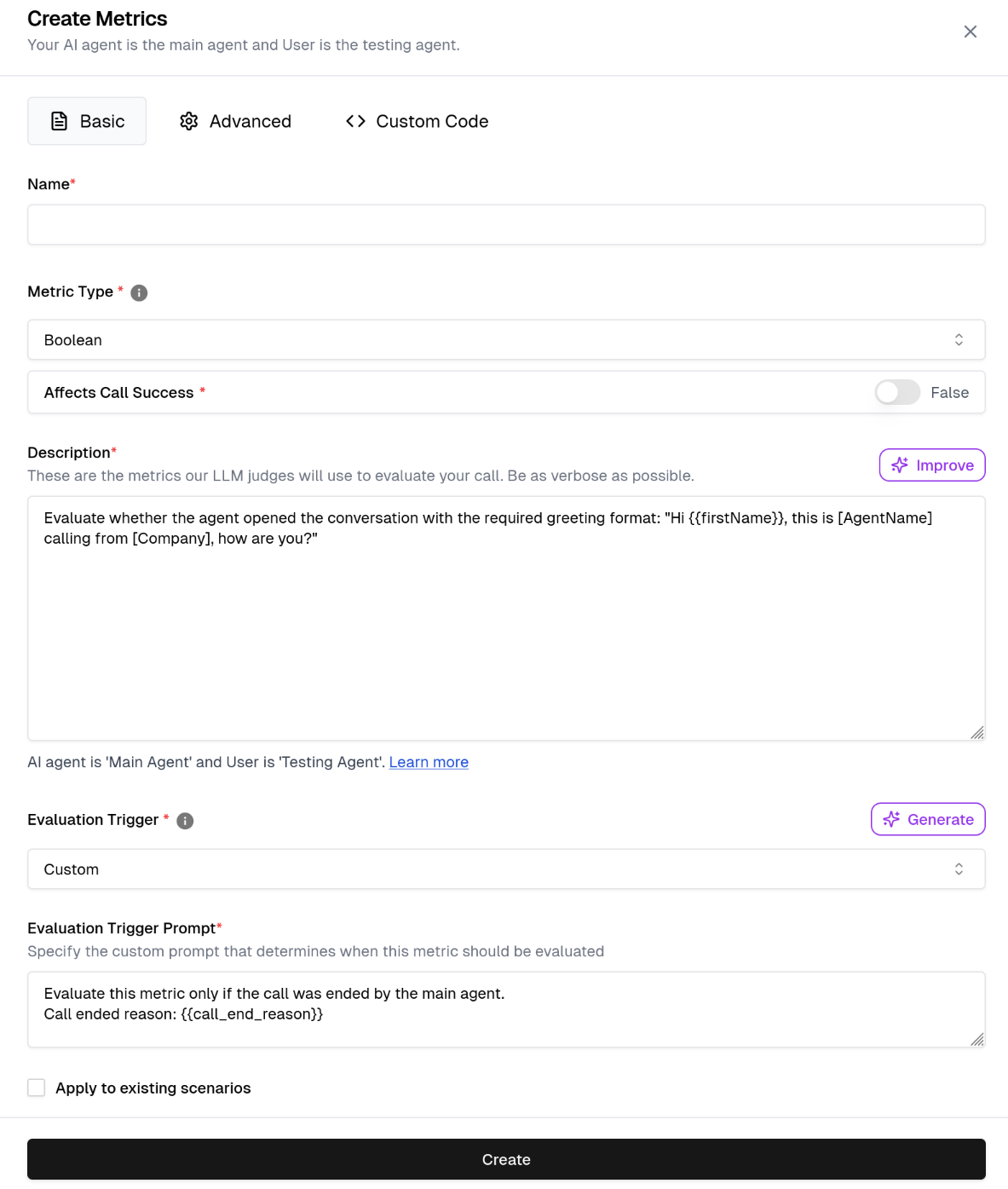
Key Points
- Variables are case-sensitive:
{{user_name}}≠{{User_Name}} - Not all variables exist in every call - handle missing values
- Variables must be accessed with their namespace prefix:
- Use
{{metadata.ringing_duration}}to access metadata fields - Use
{{dynamic_variables.user_name}}to access dynamic variables - Dot notation:
{{metadata.customer_id}} - Bracket notation:
{{metadata["customer_id"]}}(both work the same)
- Use