
Overview

Monitor your Pipecat-based voice agents with Cekura’s observability tools. Automatically capture transcripts, audio recordings, tool calls, and session metadata with minimal integration effort. What you get:
  • Complete agent side conversation transcript
  • Tool/function calls with inputs and outputs
  • Dual-channel audio recording (agent + user)
  • Session metadata for correlation and debugging

Prerequisites

  • A Cekura account with an API key
  • A Pipecat agent project

Setup

1

Install the Cekura Python SDK

pip install cekura[pipecat]==1.2.0rc1
2

Integrate the SDK in your Pipecat agent

Add the Cekura tracer to your Pipecat agent with three simple steps:
  1. Initialize the tracer with your API key and agent ID
  2. Observe your pipeline to capture transcripts and tool calls
  3. Register task handlers to enable audio recording
import os
from cekura.pipecat import PipecatTracer

async def run_bot(transport, runner_args):
    session_id = getattr(runner_args, "session_id", "") or None

    context = LLMContext(...)
    user_aggregator, assistant_aggregator = LLMContextAggregatorPair(context, ...)

    pipeline = Pipeline([ ... ])

    # (1) Initialize Cekura tracer
    cekura = PipecatTracer(
        api_key=os.getenv("CEKURA_API_KEY"),
        agent_id=123,  # Your agent ID from Cekura dashboard
    )

    # (2) Observe pipeline
    pipeline = cekura.observe_pipeline(pipeline, context, session_id=session_id)

    task = PipelineTask(pipeline, ...)

    # (3) Register task handlers for audio recording
    task = cekura.register_task_handlers(task, transport=transport)

    # Run pipeline
    runner = PipelineRunner()
    await runner.run(task)
What this does:
  • Captures transcripts, tool calls, and session metadata
  • Records dual-channel audio for analysis
  • Exports data to Cekura observability endpoint
3

Configure Pipecat provider in Cekura

Navigate to your agent settings in the Cekura dashboard and select Pipecat as the provider:Required configuration:
  • Provider: Select “Pipecat” as your voice integration provider
  • Agent ID: Your unique agent identifier from the Cekura dashboard
4

Monitor production calls

Once configured, all production calls will automatically appear in the Calls section of your Cekura dashboard with enhanced data.

Enhanced Data in Cekura UI

With observability enabled, you’ll see enriched information in the Cekura platform:
  • Complete Transcript: Full conversation history with UTC timestamps
  • Tool Calls: Function call requests and responses with inputs and outputs
  • Session Metadata: Session IDs for correlating Cekura calls with your logs
  • Audio Recording: Dual-channel recordings (agent + user) for quality monitoring
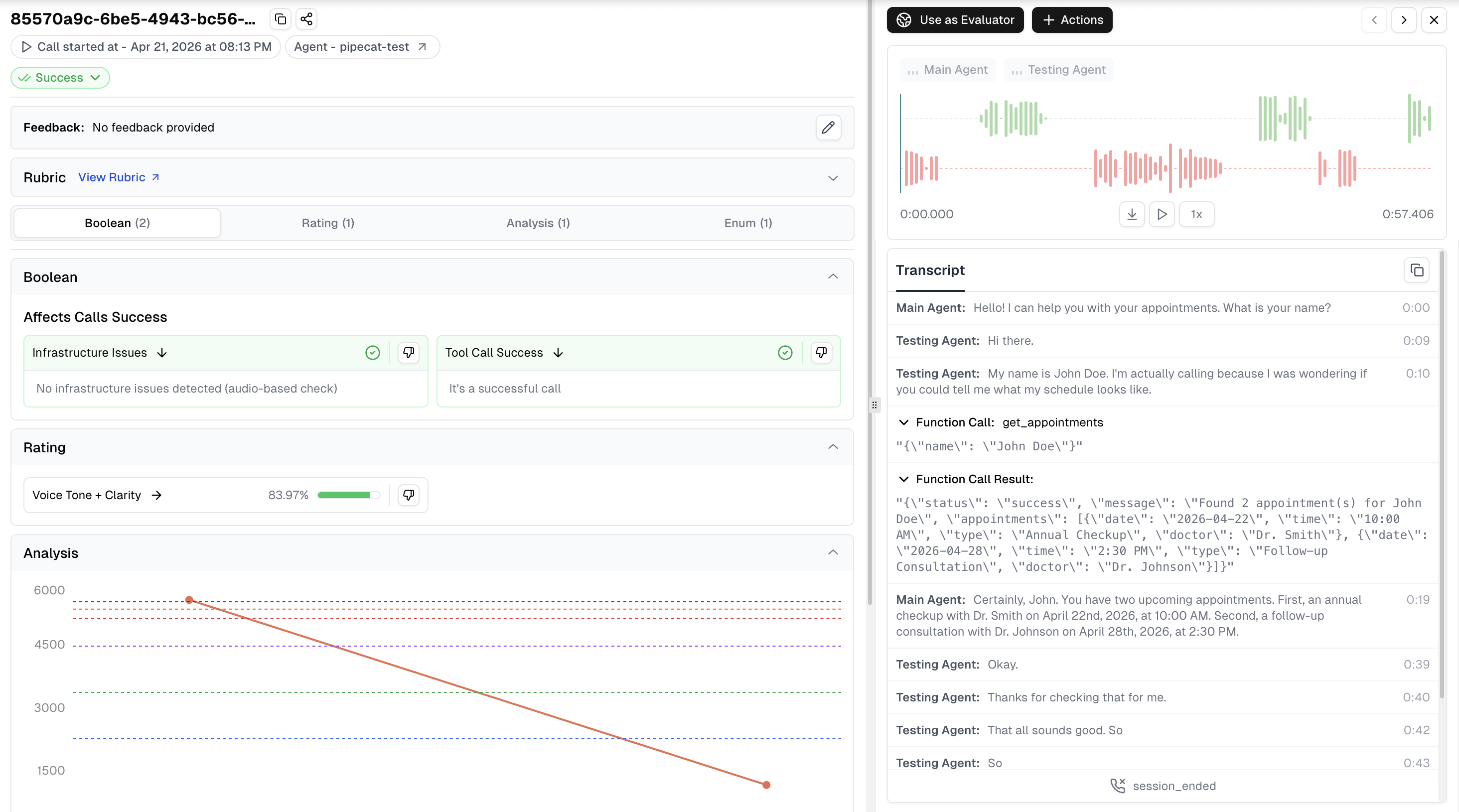
Pipecat Enhanced Data in Cekura UI

SDK Reference

PipecatTracer Initialization

from cekura.pipecat import PipecatTracer

tracer = PipecatTracer(
    api_key="your_api_key",         # Required: Your Cekura API key
    agent_id=123,                   # Required: Agent ID from dashboard
    host="https://api.cekura.ai",   # Optional: Custom API host
    enabled=True                    # Optional: Enable/disable tracer
)

observe_pipeline()

Adds observability to your Pipecat pipeline. Captures transcripts, tool calls, and session metadata.
pipeline = tracer.observe_pipeline(
    pipeline,          # Required: Pipecat Pipeline instance
    context,           # Required: LLMContext instance
    session_id=None    # Optional: Custom session identifier
)

register_task_handlers()

Registers cleanup handlers for automatic resource management when the session ends.
task = tracer.register_task_handlers(
    task,              # Required: PipelineTask instance
    transport=None     # Optional: Transport for additional cleanup
)
Environment variables:
  • CEKURA_OBSERVABILITY_ENABLED="false": Disable observability entirely

Troubleshooting

Missing Aggregators Warning

If you see:
Cekura observability disabled: LLMUserAggregator and LLMAssistantAggregator not found in pipeline.
Your pipeline must include LLMUserAggregator and LLMAssistantAggregator for transcript capture. Add aggregators to your pipeline:
from pipecat.processors.aggregators.llm_response_universal import (
    LLMContextAggregatorPair,
    LLMUserAggregatorParams,
)
from pipecat.audio.vad.silero import SileroVADAnalyzer

user_agg, assistant_agg = LLMContextAggregatorPair(
    context,
    user_params=LLMUserAggregatorParams(
        vad_analyzer=SileroVADAnalyzer()
    )
)

pipeline = Pipeline([
    transport.input(),
    stt,
    user_agg,      # Add user aggregator
    llm,
    tts,
    transport.output(),
    assistant_agg,  # Add assistant aggregator
])

Import Error

If you see:
ImportError: PipecatTracer requires additional dependencies. Install with: pip install cekura[pipecat]
Install the pipecat dependencies:
pip install cekura[pipecat]

Best Practices

  1. Use environment variables for credentials: Don’t hardcode API keys in your code
  2. Keep the SDK updated: Run pip install --upgrade cekura periodically for the latest features
  3. Use session IDs: Pass custom session IDs to correlate Cekura data with your application logs

Next Steps