> ## Documentation Index
> Fetch the complete documentation index at: https://docs.cekura.ai/llms.txt
> Use this file to discover all available pages before exploring further.
# Rubric Configuration
> Define custom success criteria for your evaluations
export const CopyPageButton = () => {
if (typeof window !== 'undefined') {
setTimeout(function () {
if (document.getElementById('ck-tools')) return;
var anchor = document.getElementById('content-area') || document.querySelector('.mdx-content');
if (!anchor) return;
if (!document.getElementById('ck-style')) {
var s = document.createElement('style');
s.id = 'ck-style';
s.textContent = '#ck-tools{position:absolute;top:6px;right:0;z-index:100;font-family:inherit;}' + '.ck-row{display:inline-flex;align-items:stretch;border:1px solid rgba(0,0,0,0.15);border-radius:8px;overflow:hidden;background:#fff;}' + ':root.dark .ck-row{background:rgba(255,255,255,0.06);border-color:rgba(255,255,255,0.12);}' + '.ck-btn{padding:5px 12px;border:none;background:none;cursor:pointer;font-size:13px;font-weight:500;font-family:inherit;color:#374151;}' + ':root.dark .ck-btn{color:#d1d5db;}' + '.ck-btn:hover{background:rgba(0,0,0,0.04);}' + ':root.dark .ck-btn:hover{background:rgba(255,255,255,0.06);}' + '.ck-chevron{padding:5px 8px;border:none;background:none;cursor:pointer;font-size:14px;font-family:inherit;color:#374151;}' + ':root.dark .ck-chevron{color:#d1d5db;}' + '.ck-chevron:hover{background:rgba(0,0,0,0.04);}' + ':root.dark .ck-chevron:hover{background:rgba(255,255,255,0.06);}' + '.ck-divider{width:1px;background:rgba(0,0,0,0.12);flex-shrink:0;}' + ':root.dark .ck-divider{background:rgba(255,255,255,0.12);}' + '.ck-dd{position:absolute;top:calc(100% + 4px);right:0;min-width:180px;background:#fff;border:1px solid rgba(0,0,0,0.12);border-radius:8px;box-shadow:0 4px 12px rgba(0,0,0,0.1);padding:4px;display:none;z-index:200;}' + ':root.dark .ck-dd{background:#1f2937;border-color:rgba(255,255,255,0.1);box-shadow:0 4px 16px rgba(0,0,0,0.35);}' + '.ck-item{display:block;width:100%;padding:7px 12px;border:none;background:none;border-radius:6px;cursor:pointer;font-size:13px;font-family:inherit;text-align:left;color:#374151;}' + ':root.dark .ck-item{color:#d1d5db;}' + '.ck-item:hover{background:rgba(0,0,0,0.05);}' + ':root.dark .ck-item:hover{background:rgba(255,255,255,0.07);}';
document.head.appendChild(s);
}
var wrap = document.createElement('div');
wrap.id = 'ck-tools';
var row = document.createElement('div');
row.className = 'ck-row';
var mainBtn = document.createElement('button');
mainBtn.className = 'ck-btn';
mainBtn.textContent = 'Copy page';
var divider = document.createElement('span');
divider.className = 'ck-divider';
var chevron = document.createElement('button');
chevron.className = 'ck-chevron';
chevron.textContent = '▾';
var dd = document.createElement('div');
dd.className = 'ck-dd';
function closeDD() {
dd.style.display = 'none';
}
function openDD() {
dd.style.display = 'block';
}
chevron.onclick = function (e) {
e.stopPropagation();
if (dd.style.display === 'block') {
closeDD();
} else {
openDD();
}
};
document.addEventListener('click', function (e) {
if (!e.target.closest('#ck-tools')) {
closeDD();
}
});
document.addEventListener('keydown', function (e) {
if (e.key === 'Escape') {
closeDD();
}
});
function makeItem(label, fn) {
var b = document.createElement('button');
b.className = 'ck-item';
b.textContent = label;
b.onclick = function () {
fn();
closeDD();
};
return b;
}
function getMarkdown() {
var walk = function (node) {
if (!node) return '';
if (node.nodeType === 3) return node.textContent || '';
if (node.nodeType !== 1) return '';
var tag = node.tagName.toLowerCase();
var skip = ['script', 'style', 'svg', 'noscript', 'button', 'iframe'];
if (skip.indexOf(tag) !== -1) return '';
if (node.id === 'ck-tools') return '';
var ch = Array.from(node.childNodes).map(walk).join('');
if (tag === 'h1') return '\n# ' + ch.trim() + '\n\n';
if (tag === 'h2') return '\n## ' + ch.trim() + '\n\n';
if (tag === 'h3') return '\n### ' + ch.trim() + '\n\n';
if (tag === 'p') return '\n' + ch.trim() + '\n\n';
if (tag === 'pre') return '\n```\n' + node.textContent.trim() + '\n```\n\n';
if (tag === 'li') return '- ' + ch.trim() + '\n';
if (tag === 'code') return '`' + ch.trim() + '`';
return ch;
};
var content = document.querySelector('.mdx-content') || document.getElementById('content-area') || document.body;
return walk(content).replace(/\n\n\n+/g, '\n\n').trim();
}
function copyMd() {
var md = getMarkdown();
navigator.clipboard.writeText(md).then(function () {
mainBtn.textContent = 'Copied!';
setTimeout(function () {
mainBtn.textContent = 'Copy page';
}, 2000);
});
}
function viewMd() {
var md = getMarkdown();
var safe = md.split('&').join('&').split('<').join('<').split('>').join('>');
var html = '' + safe + '';
window.open(URL.createObjectURL(new Blob([html], {
type: 'text/html'
})), '_blank');
}
function openClaude() {
var prompt = 'Can you read this Cekura docs page ' + window.location.href + ' so I can ask you questions?';
window.open('https://claude.ai/new?q=' + encodeURIComponent(prompt), '_blank');
}
mainBtn.onclick = copyMd;
dd.appendChild(makeItem('Copy page', copyMd));
dd.appendChild(makeItem('View as Markdown', viewMd));
dd.appendChild(makeItem('Open in Claude', openClaude));
row.appendChild(mainBtn);
row.appendChild(divider);
row.appendChild(chevron);
wrap.appendChild(row);
wrap.appendChild(dd);
anchor.style.position = 'relative';
anchor.insertBefore(wrap, anchor.firstChild);
}, 50);
}
return null;
};
**Scope of this page.** This page covers how metric results translate into **evaluation success or failure** — pass/fail thresholds, AND/OR rules across multiple metrics, and which metrics affect call success. For building individual metric definitions, see [Building High-Fidelity Metrics](/documentation/guides/creating-good-metric). For the data shape each metric type returns (Boolean, Rating, Numeric, Enum), see [Output Types of Metric](/documentation/key-concepts/metrics/output-types-of-metric).
## What is Rubric Configuration?
Rubric Configuration allows you to define exactly when an evaluation should be marked as successful or failed. Instead of using default logic, you can create custom rules based on multiple metrics, set specific thresholds, and combine conditions with AND/OR logic.
### Why Use Rubric Configuration?
* Define success criteria tailored to your use case
* Combine multiple metrics to determine overall success
* Set specific thresholds for different metric types
* Automatically pass/fail evaluations based on your rules
## Which Metrics Affect Call Success
A metric affects evaluation success only when it has an active rule in the Rubric. Adding a rule for a metric makes it part of the pass/fail outcome: if the metric's score does not meet the configured threshold, the evaluation is marked as a failure. Metrics without a Rubric rule are still evaluated and their scores are visible in results, but they do not affect whether the evaluation passes or fails.
To make a metric affect call success, navigate to the Rubric and add a rule for that metric with an appropriate operator and threshold value (see [Configuring Your Rubric](#configuring-your-rubric) below).
## Navigation
To configure a rubric for your project:
1. Click on the **Rubric** tab
 ## Configuring Your Rubric
The rubric configuration page allows you to define rules for each metric in your project.
## Configuring Your Rubric
The rubric configuration page allows you to define rules for each metric in your project.
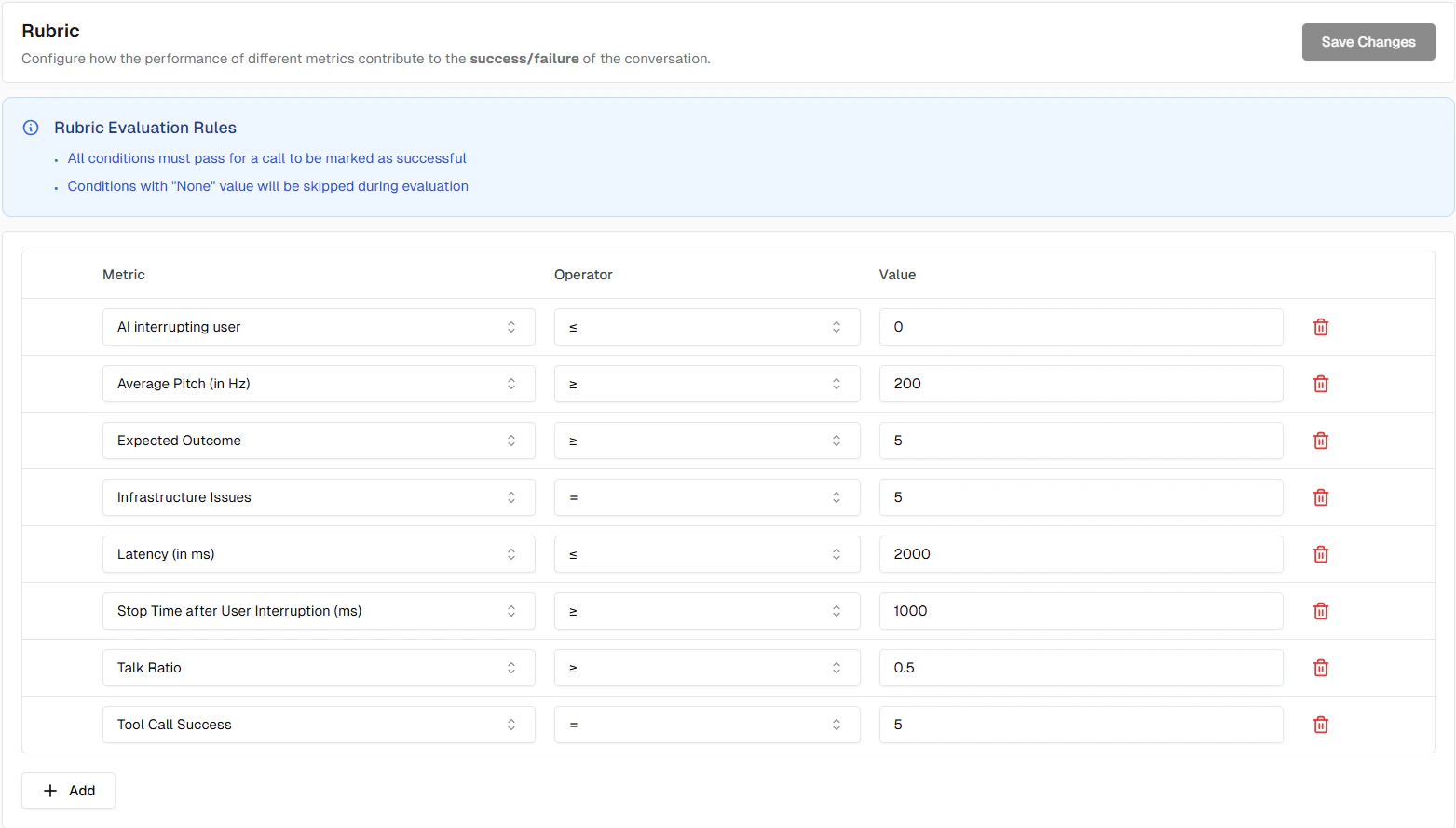 ### Components
Each rule consists of:
* **Metric**: Select which metric to evaluate
* **Operator**: The comparison operator (e.g., greater than or equal, less than or equal, equals, in)
* **Value**: The threshold or expected value
## Common Examples
### Example 1: All Boolean Metrics Must Pass
For evaluations to succeed, all binary metrics must have a score of 5 (success):
* **Rule 1**: Workflow Adherence score greater than or equal to 5
* **Rule 2**: Task Completion score greater than or equal to 5
### Example 2: Acceptable Latency Threshold
Require low latency in addition to workflow adherence:
* **Rule 1**: Workflow Adherence score greater than or equal to 5
* **Rule 2**: Latency score less than or equal to 2000
## Auto-Added Metrics
### Projects
For Projects, all default predefined metrics are automatically added to your rubric with appropriate success conditions. This gives you a ready-to-use rubric configuration from day one.
### New Boolean Metrics
When you create a new binary metric and enable the **Add to rubric rule** toggle, it is automatically added to your rubric with a default success condition:
* **Operator**: equals
* **Value**: `true` (pass)
You can edit the rule afterwards under **Settings → Rubric**.
## Tips
**Start Simple**: Begin with basic rules (e.g., all boolean metrics greater than or equal to 5) and add complexity as needed.
**Test Your Rubric**: After configuring, run evaluations and check if pass/fail results match your expectations.
**Use Meaningful Thresholds**: Base thresholds on real requirements, not arbitrary numbers. For example, if 2000ms is your SLA, use that value.
**Match the operator direction to the metric's interpretation**: For "lower is better" metrics (such as Unnecessary Repetition Count or Latency), use "less than or equal to" so the evaluation passes when the value is low and fails when it is too high. Using "greater than or equal to" on a "lower is better" metric will cause failures even when the score is 0 — the best possible result. For "higher is better" metrics (such as boolean pass/fail scores), use "greater than or equal to". See the *Interpretation* field on each metric in [Pre-defined Metrics](/documentation/key-concepts/metrics/pre-defined-metrics) for guidance, and [this FAQ entry](/documentation/FAQ#why-is-a-count-metric-failing-even-when-the-measured-value-is-zero) for a worked example of the mismatch symptom.
## Metric Skipping
The rubric automatically skips certain metrics:
* Metrics with null/empty values
* Metrics marked as irrelevant
When all rules are skipped, the evaluation defaults to success.
## Next Steps
Learn about different metric types
Configure test identities
### Components
Each rule consists of:
* **Metric**: Select which metric to evaluate
* **Operator**: The comparison operator (e.g., greater than or equal, less than or equal, equals, in)
* **Value**: The threshold or expected value
## Common Examples
### Example 1: All Boolean Metrics Must Pass
For evaluations to succeed, all binary metrics must have a score of 5 (success):
* **Rule 1**: Workflow Adherence score greater than or equal to 5
* **Rule 2**: Task Completion score greater than or equal to 5
### Example 2: Acceptable Latency Threshold
Require low latency in addition to workflow adherence:
* **Rule 1**: Workflow Adherence score greater than or equal to 5
* **Rule 2**: Latency score less than or equal to 2000
## Auto-Added Metrics
### Projects
For Projects, all default predefined metrics are automatically added to your rubric with appropriate success conditions. This gives you a ready-to-use rubric configuration from day one.
### New Boolean Metrics
When you create a new binary metric and enable the **Add to rubric rule** toggle, it is automatically added to your rubric with a default success condition:
* **Operator**: equals
* **Value**: `true` (pass)
You can edit the rule afterwards under **Settings → Rubric**.
## Tips
**Start Simple**: Begin with basic rules (e.g., all boolean metrics greater than or equal to 5) and add complexity as needed.
**Test Your Rubric**: After configuring, run evaluations and check if pass/fail results match your expectations.
**Use Meaningful Thresholds**: Base thresholds on real requirements, not arbitrary numbers. For example, if 2000ms is your SLA, use that value.
**Match the operator direction to the metric's interpretation**: For "lower is better" metrics (such as Unnecessary Repetition Count or Latency), use "less than or equal to" so the evaluation passes when the value is low and fails when it is too high. Using "greater than or equal to" on a "lower is better" metric will cause failures even when the score is 0 — the best possible result. For "higher is better" metrics (such as boolean pass/fail scores), use "greater than or equal to". See the *Interpretation* field on each metric in [Pre-defined Metrics](/documentation/key-concepts/metrics/pre-defined-metrics) for guidance, and [this FAQ entry](/documentation/FAQ#why-is-a-count-metric-failing-even-when-the-measured-value-is-zero) for a worked example of the mismatch symptom.
## Metric Skipping
The rubric automatically skips certain metrics:
* Metrics with null/empty values
* Metrics marked as irrelevant
When all rules are skipped, the evaluation defaults to success.
## Next Steps
Learn about different metric types
Configure test identities