> ## Documentation Index
> Fetch the complete documentation index at: https://docs.cekura.ai/llms.txt
> Use this file to discover all available pages before exploring further.
# LLM Judge Metric
> Evaluate AI voice agent calls using natural language criteria with LLM-powered judging
export const CopyPageButton = () => {
if (typeof window !== 'undefined') {
setTimeout(function () {
if (document.getElementById('ck-tools')) return;
var anchor = document.getElementById('content-area') || document.querySelector('.mdx-content');
if (!anchor) return;
if (!document.getElementById('ck-style')) {
var s = document.createElement('style');
s.id = 'ck-style';
s.textContent = '#ck-tools{position:absolute;top:6px;right:0;z-index:100;font-family:inherit;}' + '.ck-row{display:inline-flex;align-items:stretch;border:1px solid rgba(0,0,0,0.15);border-radius:8px;overflow:hidden;background:#fff;}' + ':root.dark .ck-row{background:rgba(255,255,255,0.06);border-color:rgba(255,255,255,0.12);}' + '.ck-btn{padding:5px 12px;border:none;background:none;cursor:pointer;font-size:13px;font-weight:500;font-family:inherit;color:#374151;}' + ':root.dark .ck-btn{color:#d1d5db;}' + '.ck-btn:hover{background:rgba(0,0,0,0.04);}' + ':root.dark .ck-btn:hover{background:rgba(255,255,255,0.06);}' + '.ck-chevron{padding:5px 8px;border:none;background:none;cursor:pointer;font-size:14px;font-family:inherit;color:#374151;}' + ':root.dark .ck-chevron{color:#d1d5db;}' + '.ck-chevron:hover{background:rgba(0,0,0,0.04);}' + ':root.dark .ck-chevron:hover{background:rgba(255,255,255,0.06);}' + '.ck-divider{width:1px;background:rgba(0,0,0,0.12);flex-shrink:0;}' + ':root.dark .ck-divider{background:rgba(255,255,255,0.12);}' + '.ck-dd{position:absolute;top:calc(100% + 4px);right:0;min-width:180px;background:#fff;border:1px solid rgba(0,0,0,0.12);border-radius:8px;box-shadow:0 4px 12px rgba(0,0,0,0.1);padding:4px;display:none;z-index:200;}' + ':root.dark .ck-dd{background:#1f2937;border-color:rgba(255,255,255,0.1);box-shadow:0 4px 16px rgba(0,0,0,0.35);}' + '.ck-item{display:block;width:100%;padding:7px 12px;border:none;background:none;border-radius:6px;cursor:pointer;font-size:13px;font-family:inherit;text-align:left;color:#374151;}' + ':root.dark .ck-item{color:#d1d5db;}' + '.ck-item:hover{background:rgba(0,0,0,0.05);}' + ':root.dark .ck-item:hover{background:rgba(255,255,255,0.07);}';
document.head.appendChild(s);
}
var wrap = document.createElement('div');
wrap.id = 'ck-tools';
var row = document.createElement('div');
row.className = 'ck-row';
var mainBtn = document.createElement('button');
mainBtn.className = 'ck-btn';
mainBtn.textContent = 'Copy page';
var divider = document.createElement('span');
divider.className = 'ck-divider';
var chevron = document.createElement('button');
chevron.className = 'ck-chevron';
chevron.textContent = '▾';
var dd = document.createElement('div');
dd.className = 'ck-dd';
function closeDD() {
dd.style.display = 'none';
}
function openDD() {
dd.style.display = 'block';
}
chevron.onclick = function (e) {
e.stopPropagation();
if (dd.style.display === 'block') {
closeDD();
} else {
openDD();
}
};
document.addEventListener('click', function (e) {
if (!e.target.closest('#ck-tools')) {
closeDD();
}
});
document.addEventListener('keydown', function (e) {
if (e.key === 'Escape') {
closeDD();
}
});
function makeItem(label, fn) {
var b = document.createElement('button');
b.className = 'ck-item';
b.textContent = label;
b.onclick = function () {
fn();
closeDD();
};
return b;
}
function getMarkdown() {
var walk = function (node) {
if (!node) return '';
if (node.nodeType === 3) return node.textContent || '';
if (node.nodeType !== 1) return '';
var tag = node.tagName.toLowerCase();
var skip = ['script', 'style', 'svg', 'noscript', 'button', 'iframe'];
if (skip.indexOf(tag) !== -1) return '';
if (node.id === 'ck-tools') return '';
var ch = Array.from(node.childNodes).map(walk).join('');
if (tag === 'h1') return '\n# ' + ch.trim() + '\n\n';
if (tag === 'h2') return '\n## ' + ch.trim() + '\n\n';
if (tag === 'h3') return '\n### ' + ch.trim() + '\n\n';
if (tag === 'p') return '\n' + ch.trim() + '\n\n';
if (tag === 'pre') return '\n```\n' + node.textContent.trim() + '\n```\n\n';
if (tag === 'li') return '- ' + ch.trim() + '\n';
if (tag === 'code') return '`' + ch.trim() + '`';
return ch;
};
var content = document.querySelector('.mdx-content') || document.getElementById('content-area') || document.body;
return walk(content).replace(/\n\n\n+/g, '\n\n').trim();
}
function copyMd() {
var md = getMarkdown();
navigator.clipboard.writeText(md).then(function () {
mainBtn.textContent = 'Copied!';
setTimeout(function () {
mainBtn.textContent = 'Copy page';
}, 2000);
});
}
function viewMd() {
var md = getMarkdown();
var safe = md.split('&').join('&').split('<').join('<').split('>').join('>');
var html = '' + safe + '';
window.open(URL.createObjectURL(new Blob([html], {
type: 'text/html'
})), '_blank');
}
function openClaude() {
var prompt = 'Can you read this Cekura docs page ' + window.location.href + ' so I can ask you questions?';
window.open('https://claude.ai/new?q=' + encodeURIComponent(prompt), '_blank');
}
mainBtn.onclick = copyMd;
dd.appendChild(makeItem('Copy page', copyMd));
dd.appendChild(makeItem('View as Markdown', viewMd));
dd.appendChild(makeItem('Open in Claude', openClaude));
row.appendChild(mainBtn);
row.appendChild(divider);
row.appendChild(chevron);
wrap.appendChild(row);
wrap.appendChild(dd);
anchor.style.position = 'relative';
anchor.insertBefore(wrap, anchor.firstChild);
}, 50);
}
return null;
};
LLM Judge Metrics allow you to evaluate your AI voice agent calls using natural language descriptions. Instead of writing code, you simply describe what constitutes success in plain English, and the system automatically evaluates each call against your criteria. This makes it easy to create custom evaluations without programming knowledge.
For the canonical reference of `{{...}}` variables you can use in your metric prompts — and which are available in **Simulation** vs. **Observability** — see [Metric Variables](/documentation/key-concepts/metrics/metric-variables).
### What You Can Evaluate
LLM Judge Metrics are ideal for evaluating qualitative aspects of conversations that require understanding context and nuance:
* **Workflow Compliance:** Check if agents followed specific steps or procedures
* **Communication Quality:** Assess tone, clarity, professionalism, or empathy
* **Information Accuracy:** Verify agents provided correct information or asked required questions
* **Customer Handling:** Evaluate objection handling, de-escalation, or problem resolution
* **Policy Adherence:** Ensure agents stayed within company policies and guidelines
* **Call Outcomes:** Determine if desired outcomes were achieved (bookings, resolutions, etc.)
### Benefits
* **No Coding Required:** Write evaluations in natural language, no programming skills needed
* **Flexible & Adaptable:** Easily modify criteria by updating your metric description
* **Context-Aware:** Understands conversational context, not just keyword matching
* **Dynamic Variables:** Use call-specific data (customer info, metadata) in your evaluations
### Creating LLM Judge Metrics
Navigate to the **Metrics** section and select **Create Metric**.
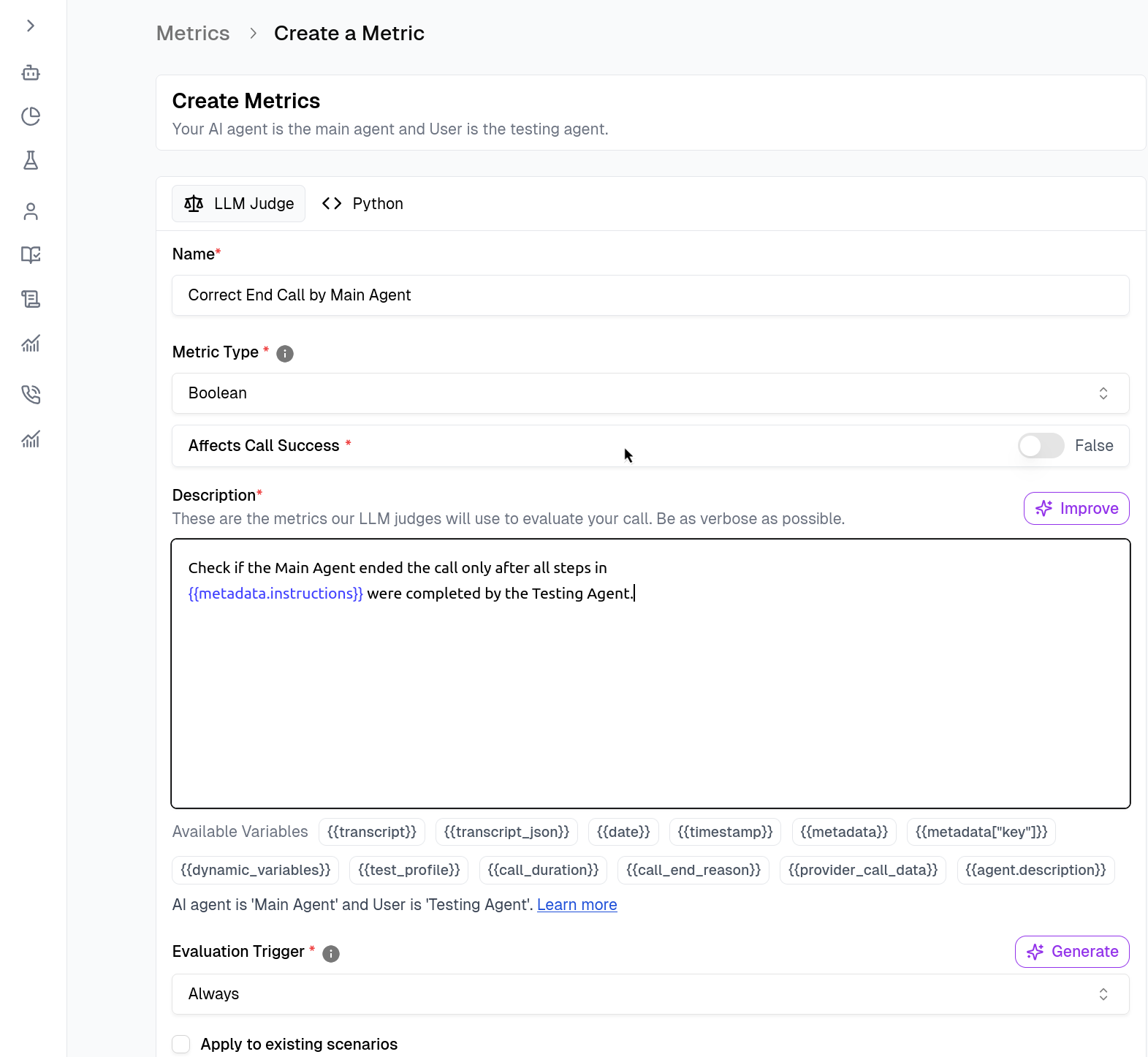 1. **Name & Type:** Give your metric a descriptive name (e.g., `Correct End Call by Main Agent`).
2. **Description (The Prompt):** Write a natural language description of what constitutes success. This is what the LLM Judge will use to evaluate calls.
Use context variables to make the metric dynamic. For example, use `{{metadata.instructions}}` to reference specific scenario steps the agent was supposed to follow.
You will see a list of context variables in the dashboard when creating a metric. See [Metric Variables](/documentation/key-concepts/metrics/metric-variables) for a complete list.
**Example Description:**
```
Check if the Main Agent ended the call only after all steps in
{{metadata.instructions}} were completed by the Testing Agent.
```
#### Set Triggers
Define when the metric should run under the **Evaluation Trigger** section.
* **Always:** Runs on every call (default).
* **Custom:** Use logic to run metrics only in specific scenarios. You can write a trigger prompt in natural language, or write Python code that decides when the metric should run. Trigger code receives the same [`data`](/documentation/key-concepts/metrics/python-metric#evaluation-trigger-custom-code) dictionary as a Python metric and sets `_result` (a bool — `True` to run, `False` to skip) and `_explanation`. See [Evaluation Trigger (Custom Code)](/documentation/key-concepts/metrics/python-metric#evaluation-trigger-custom-code) for the contract and an example.
### Testing Your Metrics
Before saving, validate your logic immediately within the builder.
1. **Name & Type:** Give your metric a descriptive name (e.g., `Correct End Call by Main Agent`).
2. **Description (The Prompt):** Write a natural language description of what constitutes success. This is what the LLM Judge will use to evaluate calls.
Use context variables to make the metric dynamic. For example, use `{{metadata.instructions}}` to reference specific scenario steps the agent was supposed to follow.
You will see a list of context variables in the dashboard when creating a metric. See [Metric Variables](/documentation/key-concepts/metrics/metric-variables) for a complete list.
**Example Description:**
```
Check if the Main Agent ended the call only after all steps in
{{metadata.instructions}} were completed by the Testing Agent.
```
#### Set Triggers
Define when the metric should run under the **Evaluation Trigger** section.
* **Always:** Runs on every call (default).
* **Custom:** Use logic to run metrics only in specific scenarios. You can write a trigger prompt in natural language, or write Python code that decides when the metric should run. Trigger code receives the same [`data`](/documentation/key-concepts/metrics/python-metric#evaluation-trigger-custom-code) dictionary as a Python metric and sets `_result` (a bool — `True` to run, `False` to skip) and `_explanation`. See [Evaluation Trigger (Custom Code)](/documentation/key-concepts/metrics/python-metric#evaluation-trigger-custom-code) for the contract and an example.
### Testing Your Metrics
Before saving, validate your logic immediately within the builder.
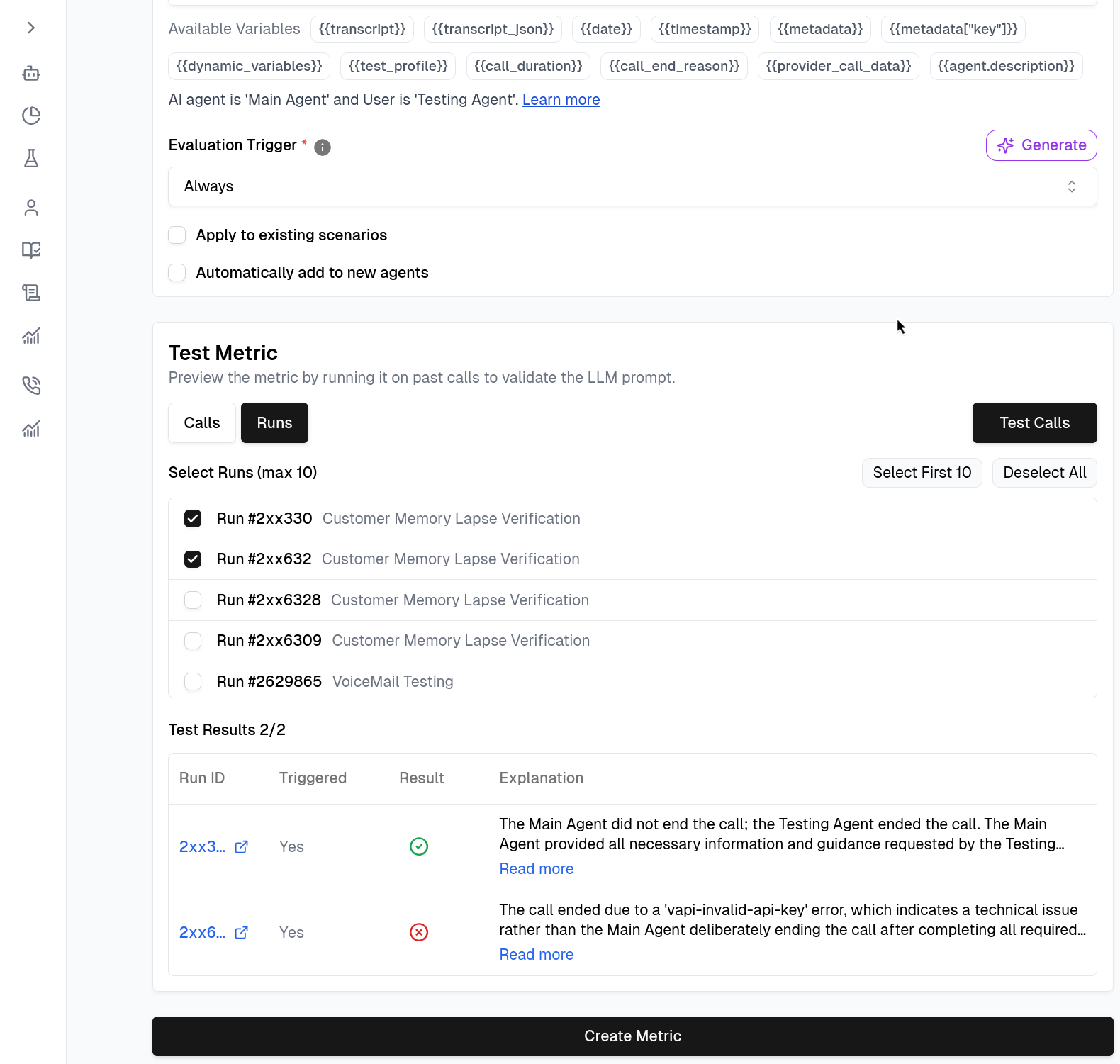 Navigate to the test section within the metric builder.
Select a few past **Call IDs** from the list to test against.
Run the test to see if the metric passes/fails as expected on historical data.
If satisfied with the results, click **Create Metric** to save.
## Audio Evaluation
When calling LLM Judge metrics from Python code, you can set `audio=True` to have the judge analyze the actual voice recording instead of (or in addition to) the transcript text. This is useful for evaluating speech delivery, pacing, tone, and other audio properties that the transcript alone cannot capture.
```python theme={null}
response = evaluate_llm_judge_metric(
data,
api_key,
description="Did the agent speak clearly and at an appropriate pace?",
eval_type="binary",
audio=True,
audio_start_time=5.2, # optional: clip start in seconds
audio_end_time=12.8, # optional: clip end in seconds
)
```
See [Python Metric — Audio-Based Analysis](/documentation/key-concepts/metrics/python-metric#audio-based-analysis) for the full pattern.
## Related Documentation
* [Metric Variables](/documentation/key-concepts/metrics/metric-variables) - Variables you can use in metric descriptions
* [Creating Good Metrics](/documentation/guides/creating-good-metric) - Complete guide for building high-fidelity metrics
* [Python Metric](/documentation/key-concepts/metrics/python-metric) - Write custom evaluation logic in Python, including audio-based evaluation
* [Pre-defined Metrics](/documentation/key-concepts/metrics/pre-defined-metrics) - Generic metrics provided by Cekura
Navigate to the test section within the metric builder.
Select a few past **Call IDs** from the list to test against.
Run the test to see if the metric passes/fails as expected on historical data.
If satisfied with the results, click **Create Metric** to save.
## Audio Evaluation
When calling LLM Judge metrics from Python code, you can set `audio=True` to have the judge analyze the actual voice recording instead of (or in addition to) the transcript text. This is useful for evaluating speech delivery, pacing, tone, and other audio properties that the transcript alone cannot capture.
```python theme={null}
response = evaluate_llm_judge_metric(
data,
api_key,
description="Did the agent speak clearly and at an appropriate pace?",
eval_type="binary",
audio=True,
audio_start_time=5.2, # optional: clip start in seconds
audio_end_time=12.8, # optional: clip end in seconds
)
```
See [Python Metric — Audio-Based Analysis](/documentation/key-concepts/metrics/python-metric#audio-based-analysis) for the full pattern.
## Related Documentation
* [Metric Variables](/documentation/key-concepts/metrics/metric-variables) - Variables you can use in metric descriptions
* [Creating Good Metrics](/documentation/guides/creating-good-metric) - Complete guide for building high-fidelity metrics
* [Python Metric](/documentation/key-concepts/metrics/python-metric) - Write custom evaluation logic in Python, including audio-based evaluation
* [Pre-defined Metrics](/documentation/key-concepts/metrics/pre-defined-metrics) - Generic metrics provided by Cekura