> ## Documentation Index
> Fetch the complete documentation index at: https://docs.cekura.ai/llms.txt
> Use this file to discover all available pages before exploring further.
# AssemblyAI Integration
> Connect an AssemblyAI Voice Agent to Cekura to run phone-based simulations and pull the AssemblyAI transcript and tool calls into every result.
export const CopyPageButton = () => {
if (typeof window !== 'undefined') {
setTimeout(function () {
if (document.getElementById('ck-tools')) return;
var anchor = document.getElementById('content-area') || document.querySelector('.mdx-content');
if (!anchor) return;
if (!document.getElementById('ck-style')) {
var s = document.createElement('style');
s.id = 'ck-style';
s.textContent = '#ck-tools{position:absolute;top:6px;right:0;z-index:100;font-family:inherit;}' + '.ck-row{display:inline-flex;align-items:stretch;border:1px solid rgba(0,0,0,0.15);border-radius:8px;overflow:hidden;background:#fff;}' + ':root.dark .ck-row{background:rgba(255,255,255,0.06);border-color:rgba(255,255,255,0.12);}' + '.ck-btn{padding:5px 12px;border:none;background:none;cursor:pointer;font-size:13px;font-weight:500;font-family:inherit;color:#374151;}' + ':root.dark .ck-btn{color:#d1d5db;}' + '.ck-btn:hover{background:rgba(0,0,0,0.04);}' + ':root.dark .ck-btn:hover{background:rgba(255,255,255,0.06);}' + '.ck-chevron{padding:5px 8px;border:none;background:none;cursor:pointer;font-size:14px;font-family:inherit;color:#374151;}' + ':root.dark .ck-chevron{color:#d1d5db;}' + '.ck-chevron:hover{background:rgba(0,0,0,0.04);}' + ':root.dark .ck-chevron:hover{background:rgba(255,255,255,0.06);}' + '.ck-divider{width:1px;background:rgba(0,0,0,0.12);flex-shrink:0;}' + ':root.dark .ck-divider{background:rgba(255,255,255,0.12);}' + '.ck-dd{position:absolute;top:calc(100% + 4px);right:0;min-width:180px;background:#fff;border:1px solid rgba(0,0,0,0.12);border-radius:8px;box-shadow:0 4px 12px rgba(0,0,0,0.1);padding:4px;display:none;z-index:200;}' + ':root.dark .ck-dd{background:#1f2937;border-color:rgba(255,255,255,0.1);box-shadow:0 4px 16px rgba(0,0,0,0.35);}' + '.ck-item{display:block;width:100%;padding:7px 12px;border:none;background:none;border-radius:6px;cursor:pointer;font-size:13px;font-family:inherit;text-align:left;color:#374151;}' + ':root.dark .ck-item{color:#d1d5db;}' + '.ck-item:hover{background:rgba(0,0,0,0.05);}' + ':root.dark .ck-item:hover{background:rgba(255,255,255,0.07);}';
document.head.appendChild(s);
}
var wrap = document.createElement('div');
wrap.id = 'ck-tools';
var row = document.createElement('div');
row.className = 'ck-row';
var mainBtn = document.createElement('button');
mainBtn.className = 'ck-btn';
mainBtn.textContent = 'Copy page';
var divider = document.createElement('span');
divider.className = 'ck-divider';
var chevron = document.createElement('button');
chevron.className = 'ck-chevron';
chevron.textContent = '▾';
var dd = document.createElement('div');
dd.className = 'ck-dd';
function closeDD() {
dd.style.display = 'none';
}
function openDD() {
dd.style.display = 'block';
}
chevron.onclick = function (e) {
e.stopPropagation();
if (dd.style.display === 'block') {
closeDD();
} else {
openDD();
}
};
document.addEventListener('click', function (e) {
if (!e.target.closest('#ck-tools')) {
closeDD();
}
});
document.addEventListener('keydown', function (e) {
if (e.key === 'Escape') {
closeDD();
}
});
function makeItem(label, fn) {
var b = document.createElement('button');
b.className = 'ck-item';
b.textContent = label;
b.onclick = function () {
fn();
closeDD();
};
return b;
}
function getMarkdown() {
var walk = function (node) {
if (!node) return '';
if (node.nodeType === 3) return node.textContent || '';
if (node.nodeType !== 1) return '';
var tag = node.tagName.toLowerCase();
var skip = ['script', 'style', 'svg', 'noscript', 'button', 'iframe'];
if (skip.indexOf(tag) !== -1) return '';
if (node.id === 'ck-tools') return '';
var ch = Array.from(node.childNodes).map(walk).join('');
if (tag === 'h1') return '\n# ' + ch.trim() + '\n\n';
if (tag === 'h2') return '\n## ' + ch.trim() + '\n\n';
if (tag === 'h3') return '\n### ' + ch.trim() + '\n\n';
if (tag === 'p') return '\n' + ch.trim() + '\n\n';
if (tag === 'pre') return '\n```\n' + node.textContent.trim() + '\n```\n\n';
if (tag === 'li') return '- ' + ch.trim() + '\n';
if (tag === 'code') return '`' + ch.trim() + '`';
return ch;
};
var content = document.querySelector('.mdx-content') || document.getElementById('content-area') || document.body;
return walk(content).replace(/\n\n\n+/g, '\n\n').trim();
}
function copyMd() {
var md = getMarkdown();
navigator.clipboard.writeText(md).then(function () {
mainBtn.textContent = 'Copied!';
setTimeout(function () {
mainBtn.textContent = 'Copy page';
}, 2000);
});
}
function viewMd() {
var md = getMarkdown();
var safe = md.split('&').join('&').split('<').join('<').split('>').join('>');
var html = '' + safe + '';
window.open(URL.createObjectURL(new Blob([html], {
type: 'text/html'
})), '_blank');
}
function openClaude() {
var prompt = 'Can you read this Cekura docs page ' + window.location.href + ' so I can ask you questions?';
window.open('https://claude.ai/new?q=' + encodeURIComponent(prompt), '_blank');
}
mainBtn.onclick = copyMd;
dd.appendChild(makeItem('Copy page', copyMd));
dd.appendChild(makeItem('View as Markdown', viewMd));
dd.appendChild(makeItem('Open in Claude', openClaude));
row.appendChild(mainBtn);
row.appendChild(divider);
row.appendChild(chevron);
wrap.appendChild(row);
wrap.appendChild(dd);
anchor.style.position = 'relative';
anchor.insertBefore(wrap, anchor.firstChild);
}, 50);
}
return null;
};
## Overview
Cekura tests agents built on the [AssemblyAI Voice Agent API](https://www.assemblyai.com/docs/voice-agents/voice-agent-api) over the phone. Cekura dials the number attached to your agent, runs the scenario as a simulated caller, and then uses the AssemblyAI API to find that call and fetch its recorded conversation. The result shows the transcript as AssemblyAI recorded it, with every tool the agent called shown inline as a function call, including the arguments it sent and the response it received.
AssemblyAI connects over **telephony only**. AssemblyAI agents answer inbound calls, so Cekura always places the call; the telephony connection is enabled automatically once the AssemblyAI credentials are saved.
## Prerequisites
* An **AssemblyAI API key** with access to the Voice Agent API.
* A **stored agent** on AssemblyAI and its agent id (it starts with `agent_`).
* A **phone number** routed to that agent. AssemblyAI receives calls from a Twilio number over a SIP trunk; see [Set up an inbound phone agent via SIP](https://www.assemblyai.com/docs/voice-agents/voice-agent-api/connect-to-twilio) in the AssemblyAI docs.
AssemblyAI keeps agents, phone numbers and calls **separate per region**. Phone agents are hosted in the **US** region, and an agent created on the default (EU) host cannot answer a phone number. Create the agent and register the number on the same region, and select that region in Cekura.
## Set up AssemblyAI
Create a stored agent through the AssemblyAI API or dashboard in the region you will use for telephony, and copy its id (`agent_…`). The prompt, greeting, voice and HTTP tools all live on this agent.
Follow AssemblyAI's Twilio guide: create a Twilio SIP trunk that routes to AssemblyAI, attach your Twilio number to it, then import the number on AssemblyAI and bind the agent to it. Calling the number should reach your agent before you continue.
Copy the API key from the AssemblyAI dashboard. Cekura uses it only to list your agent's calls and download each call's conversation after a test.
## Connect AssemblyAI in Cekura
In Cekura, go to **Agents**, create an agent, and select **AssemblyAI** as the provider. If you don't see it, click **More options** to expand the full provider list.
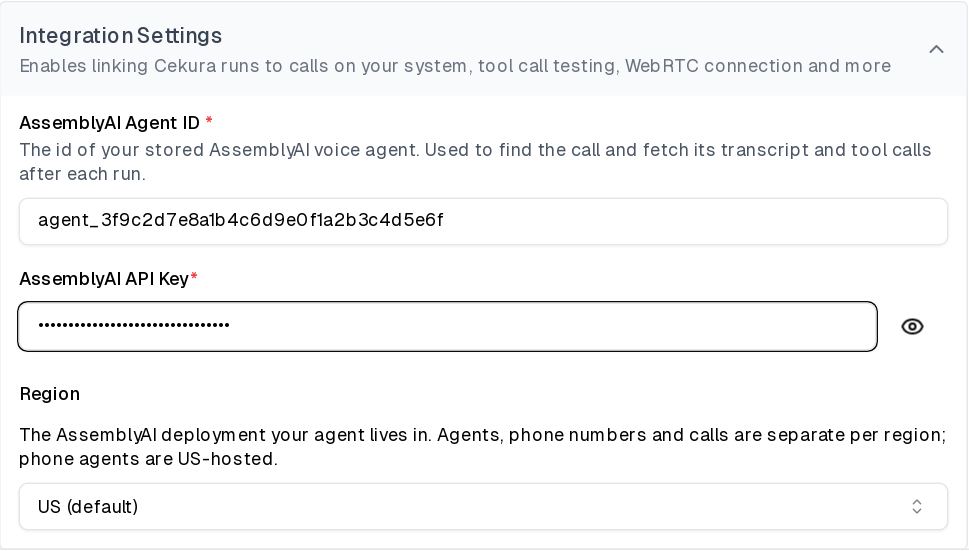
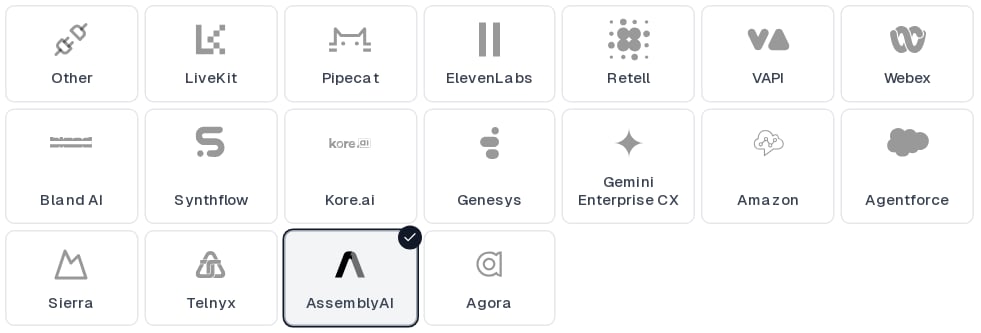 Fill in the fields under **Integration Settings**:
| Field | Value |
| ----------------------- | ------------------------------------------------------------------------------------------ |
| **AssemblyAI Agent ID** | The id of your stored agent (`agent_…`). Cekura uses it to find the calls that agent took. |
| **AssemblyAI API Key** | Your AssemblyAI API key. Stored encrypted and never shown again. |
| **Region** | The AssemblyAI region your agent lives in: **US** (default, phone agents) or **EU**. |
Fill in the fields under **Integration Settings**:
| Field | Value |
| ----------------------- | ------------------------------------------------------------------------------------------ |
| **AssemblyAI Agent ID** | The id of your stored agent (`agent_…`). Cekura uses it to find the calls that agent took. |
| **AssemblyAI API Key** | Your AssemblyAI API key. Stored encrypted and never shown again. |
| **Region** | The AssemblyAI region your agent lives in: **US** (default, phone agents) or **EU**. |
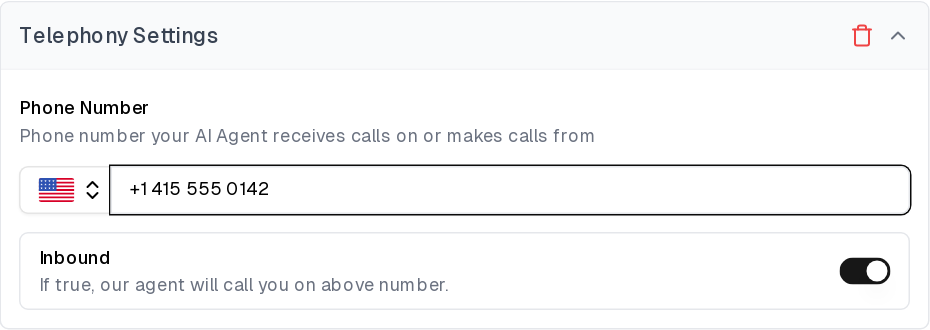
 Under **Telephony Settings**, enter the phone number attached to your AssemblyAI agent. Telephony is the only connection type for AssemblyAI and is enabled automatically. Leave **Inbound** on so Cekura dials your number.
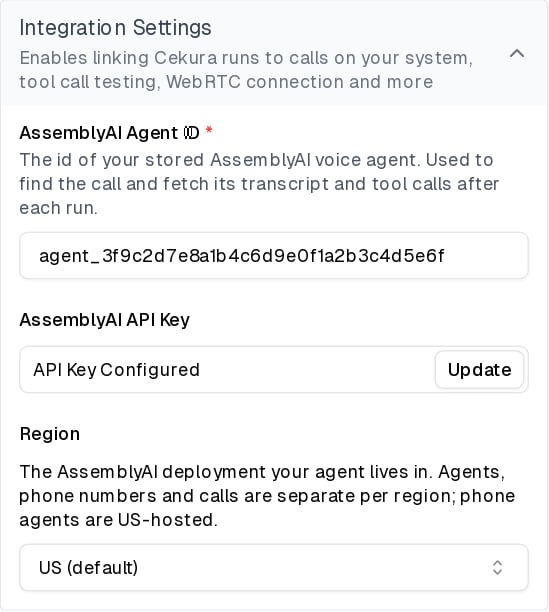
 Save the agent. The key field shows **API Key Configured** once it is stored; use **Update** to rotate it later.
 ## Run a test
Open an evaluator, click **Run**, and start the run using the **Telephony** connection. Cekura dials your AssemblyAI number and plays the scenario as the caller.
When the call ends, Cekura:
1. Lists the recent calls on your AssemblyAI account and keeps the ones answered by your agent, placed from the Cekura number, and started within a few seconds of the test call.
2. Waits for AssemblyAI to write the call's conversation record, which usually takes a few seconds after the call ends.
3. Confirms the match by comparing the call duration and the conversation content, so parallel test calls to the same agent are each paired with the right AssemblyAI call.
4. Replaces its own transcript with the AssemblyAI one and attaches the AssemblyAI call id to the result.
In the result, agent turns are labeled **Main Agent** and caller turns are labeled **Testing Agent**. Each HTTP tool the agent called appears as a **Function Call** entry followed by a **Function Call Result** entry, with the arguments AssemblyAI sent and the response your endpoint returned, so you can write metrics against what the agent actually did.
If Cekura cannot find a matching call, the result keeps Cekura's own transcript of the call. See the troubleshooting section below.
## Troubleshooting
* **Authentication fails**: check that the API key has Voice Agent API access and that the selected **Region** matches where the agent was created. A key is valid in both regions, but an agent created in one region does not exist in the other.
* **No AssemblyAI transcript on the result**: confirm the **AssemblyAI Agent ID** is the agent bound to the number under **Telephony Settings**. Cekura only considers calls answered by that agent.
* **Call not matched**: Cekura matches on the phone number it dialed from and the call's start time. Make sure the run used the **Telephony** connection and that the number under **Telephony Settings** is the one bound to the agent on AssemblyAI.
* **Number never connects**: AssemblyAI answers the call, not Cekura, so a number that does not reach the agent when dialed by hand will not work in a test either. Re-check the SIP trunk routing and the number's agent binding on AssemblyAI, in the same region as the agent.
## Configure through the API
When creating or updating an agent through the [API](/api-reference/test_framework/create-agent), set the provider to `assemblyai` and pass the credentials:
```json theme={null}
{
"transcript_provider": "assemblyai",
"assistant_id": "agent_3f9c2d7e8a1b4c6d9e0f1a2b3c4d5e6f",
"assemblyai_api_key": "",
"assemblyai_data": {
"region": "us"
},
"contact_number": "+15551234567",
"inbound": true
}
```
`assistant_id` is the AssemblyAI agent id and is required whenever a key is set. `assemblyai_data.region` is `us` (default) or `eu`. The response never returns the key. Use the read-only `assemblyai_api_key_configured` field to check whether one is stored.
## Run a test
Open an evaluator, click **Run**, and start the run using the **Telephony** connection. Cekura dials your AssemblyAI number and plays the scenario as the caller.
When the call ends, Cekura:
1. Lists the recent calls on your AssemblyAI account and keeps the ones answered by your agent, placed from the Cekura number, and started within a few seconds of the test call.
2. Waits for AssemblyAI to write the call's conversation record, which usually takes a few seconds after the call ends.
3. Confirms the match by comparing the call duration and the conversation content, so parallel test calls to the same agent are each paired with the right AssemblyAI call.
4. Replaces its own transcript with the AssemblyAI one and attaches the AssemblyAI call id to the result.
In the result, agent turns are labeled **Main Agent** and caller turns are labeled **Testing Agent**. Each HTTP tool the agent called appears as a **Function Call** entry followed by a **Function Call Result** entry, with the arguments AssemblyAI sent and the response your endpoint returned, so you can write metrics against what the agent actually did.
If Cekura cannot find a matching call, the result keeps Cekura's own transcript of the call. See the troubleshooting section below.
## Troubleshooting
* **Authentication fails**: check that the API key has Voice Agent API access and that the selected **Region** matches where the agent was created. A key is valid in both regions, but an agent created in one region does not exist in the other.
* **No AssemblyAI transcript on the result**: confirm the **AssemblyAI Agent ID** is the agent bound to the number under **Telephony Settings**. Cekura only considers calls answered by that agent.
* **Call not matched**: Cekura matches on the phone number it dialed from and the call's start time. Make sure the run used the **Telephony** connection and that the number under **Telephony Settings** is the one bound to the agent on AssemblyAI.
* **Number never connects**: AssemblyAI answers the call, not Cekura, so a number that does not reach the agent when dialed by hand will not work in a test either. Re-check the SIP trunk routing and the number's agent binding on AssemblyAI, in the same region as the agent.
## Configure through the API
When creating or updating an agent through the [API](/api-reference/test_framework/create-agent), set the provider to `assemblyai` and pass the credentials:
```json theme={null}
{
"transcript_provider": "assemblyai",
"assistant_id": "agent_3f9c2d7e8a1b4c6d9e0f1a2b3c4d5e6f",
"assemblyai_api_key": "",
"assemblyai_data": {
"region": "us"
},
"contact_number": "+15551234567",
"inbound": true
}
```
`assistant_id` is the AssemblyAI agent id and is required whenever a key is set. `assemblyai_data.region` is `us` (default) or `eu`. The response never returns the key. Use the read-only `assemblyai_api_key_configured` field to check whether one is stored.