> ## Documentation Index
> Fetch the complete documentation index at: https://docs.cekura.ai/llms.txt
> Use this file to discover all available pages before exploring further.
# Email Testing
> Test agents that communicate over email — send, receive, and evaluate full email conversations.
export const CopyPageButton = () => {
if (typeof window !== 'undefined') {
setTimeout(function () {
if (document.getElementById('ck-tools')) return;
var anchor = document.getElementById('content-area') || document.querySelector('.mdx-content');
if (!anchor) return;
if (!document.getElementById('ck-style')) {
var s = document.createElement('style');
s.id = 'ck-style';
s.textContent = '#ck-tools{position:absolute;top:6px;right:0;z-index:100;font-family:inherit;}' + '.ck-row{display:inline-flex;align-items:stretch;border:1px solid rgba(0,0,0,0.15);border-radius:8px;overflow:hidden;background:#fff;}' + ':root.dark .ck-row{background:rgba(255,255,255,0.06);border-color:rgba(255,255,255,0.12);}' + '.ck-btn{padding:5px 12px;border:none;background:none;cursor:pointer;font-size:13px;font-weight:500;font-family:inherit;color:#374151;}' + ':root.dark .ck-btn{color:#d1d5db;}' + '.ck-btn:hover{background:rgba(0,0,0,0.04);}' + ':root.dark .ck-btn:hover{background:rgba(255,255,255,0.06);}' + '.ck-chevron{padding:5px 8px;border:none;background:none;cursor:pointer;font-size:14px;font-family:inherit;color:#374151;}' + ':root.dark .ck-chevron{color:#d1d5db;}' + '.ck-chevron:hover{background:rgba(0,0,0,0.04);}' + ':root.dark .ck-chevron:hover{background:rgba(255,255,255,0.06);}' + '.ck-divider{width:1px;background:rgba(0,0,0,0.12);flex-shrink:0;}' + ':root.dark .ck-divider{background:rgba(255,255,255,0.12);}' + '.ck-dd{position:absolute;top:calc(100% + 4px);right:0;min-width:180px;background:#fff;border:1px solid rgba(0,0,0,0.12);border-radius:8px;box-shadow:0 4px 12px rgba(0,0,0,0.1);padding:4px;display:none;z-index:200;}' + ':root.dark .ck-dd{background:#1f2937;border-color:rgba(255,255,255,0.1);box-shadow:0 4px 16px rgba(0,0,0,0.35);}' + '.ck-item{display:block;width:100%;padding:7px 12px;border:none;background:none;border-radius:6px;cursor:pointer;font-size:13px;font-family:inherit;text-align:left;color:#374151;}' + ':root.dark .ck-item{color:#d1d5db;}' + '.ck-item:hover{background:rgba(0,0,0,0.05);}' + ':root.dark .ck-item:hover{background:rgba(255,255,255,0.07);}';
document.head.appendChild(s);
}
var wrap = document.createElement('div');
wrap.id = 'ck-tools';
var row = document.createElement('div');
row.className = 'ck-row';
var mainBtn = document.createElement('button');
mainBtn.className = 'ck-btn';
mainBtn.textContent = 'Copy page';
var divider = document.createElement('span');
divider.className = 'ck-divider';
var chevron = document.createElement('button');
chevron.className = 'ck-chevron';
chevron.textContent = '▾';
var dd = document.createElement('div');
dd.className = 'ck-dd';
function closeDD() {
dd.style.display = 'none';
}
function openDD() {
dd.style.display = 'block';
}
chevron.onclick = function (e) {
e.stopPropagation();
if (dd.style.display === 'block') {
closeDD();
} else {
openDD();
}
};
document.addEventListener('click', function (e) {
if (!e.target.closest('#ck-tools')) {
closeDD();
}
});
document.addEventListener('keydown', function (e) {
if (e.key === 'Escape') {
closeDD();
}
});
function makeItem(label, fn) {
var b = document.createElement('button');
b.className = 'ck-item';
b.textContent = label;
b.onclick = function () {
fn();
closeDD();
};
return b;
}
function getMarkdown() {
var walk = function (node) {
if (!node) return '';
if (node.nodeType === 3) return node.textContent || '';
if (node.nodeType !== 1) return '';
var tag = node.tagName.toLowerCase();
var skip = ['script', 'style', 'svg', 'noscript', 'button', 'iframe'];
if (skip.indexOf(tag) !== -1) return '';
if (node.id === 'ck-tools') return '';
var ch = Array.from(node.childNodes).map(walk).join('');
if (tag === 'h1') return '\n# ' + ch.trim() + '\n\n';
if (tag === 'h2') return '\n## ' + ch.trim() + '\n\n';
if (tag === 'h3') return '\n### ' + ch.trim() + '\n\n';
if (tag === 'p') return '\n' + ch.trim() + '\n\n';
if (tag === 'pre') return '\n```\n' + node.textContent.trim() + '\n```\n\n';
if (tag === 'li') return '- ' + ch.trim() + '\n';
if (tag === 'code') return '`' + ch.trim() + '`';
return ch;
};
var content = document.querySelector('.mdx-content') || document.getElementById('content-area') || document.body;
return walk(content).replace(/\n\n\n+/g, '\n\n').trim();
}
function copyMd() {
var md = getMarkdown();
navigator.clipboard.writeText(md).then(function () {
mainBtn.textContent = 'Copied!';
setTimeout(function () {
mainBtn.textContent = 'Copy page';
}, 2000);
});
}
function viewMd() {
var md = getMarkdown();
var safe = md.split('&').join('&').split('<').join('<').split('>').join('>');
var html = '' + safe + '';
window.open(URL.createObjectURL(new Blob([html], {
type: 'text/html'
})), '_blank');
}
function openClaude() {
var prompt = 'Can you read this Cekura docs page ' + window.location.href + ' so I can ask you questions?';
window.open('https://claude.ai/new?q=' + encodeURIComponent(prompt), '_blank');
}
mainBtn.onclick = copyMd;
dd.appendChild(makeItem('Copy page', copyMd));
dd.appendChild(makeItem('View as Markdown', viewMd));
dd.appendChild(makeItem('Open in Claude', openClaude));
row.appendChild(mainBtn);
row.appendChild(divider);
row.appendChild(chevron);
wrap.appendChild(row);
wrap.appendChild(dd);
anchor.style.position = 'relative';
anchor.insertBefore(wrap, anchor.firstChild);
}, 50);
}
return null;
};
## What is Email Testing?
Email testing lets you run evaluators against agents that communicate via email. Cekura acts as the user, exchanges emails with your agent, and evaluates the full conversation — no phone numbers or API keys needed beyond the agent's email address.
Use email testing for:
* Agents that handle support tickets, inquiries, or outreach via email
* Validating reply quality, threading, and tone
* Testing both inbound flows (agent replies to incoming emails) and outbound flows (agent initiates contact)
## Setting Up Email Testing
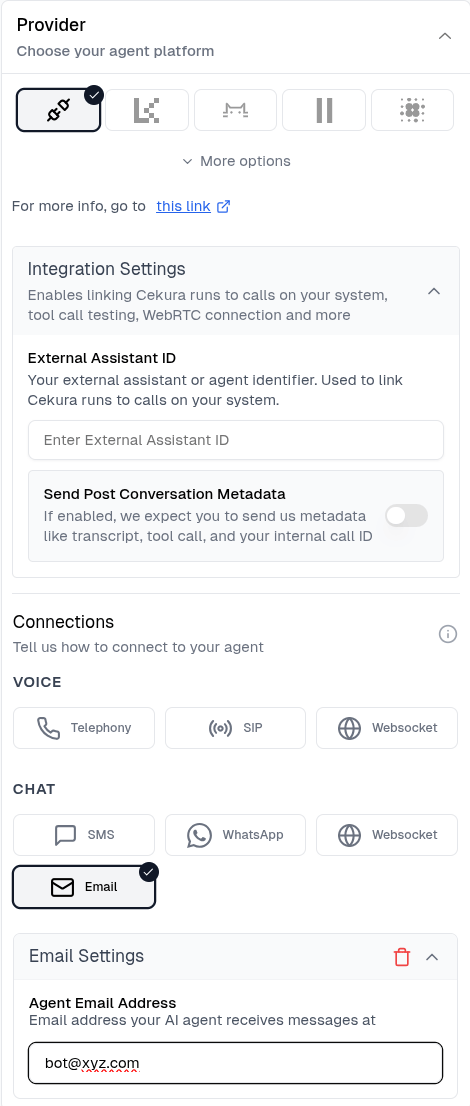
In **Agent Settings → Connections**, expand the **Email** section and enter the email address your agent monitors.
 Go to **Evaluators**, select your evaluator, and click **Run**.
In the **Configure Run** dialog, select **Email** under CHAT. The address pre-fills from agent settings — override it if needed for this run.
Go to **Evaluators**, select your evaluator, and click **Run**.
In the **Configure Run** dialog, select **Email** under CHAT. The address pre-fills from agent settings — override it if needed for this run.
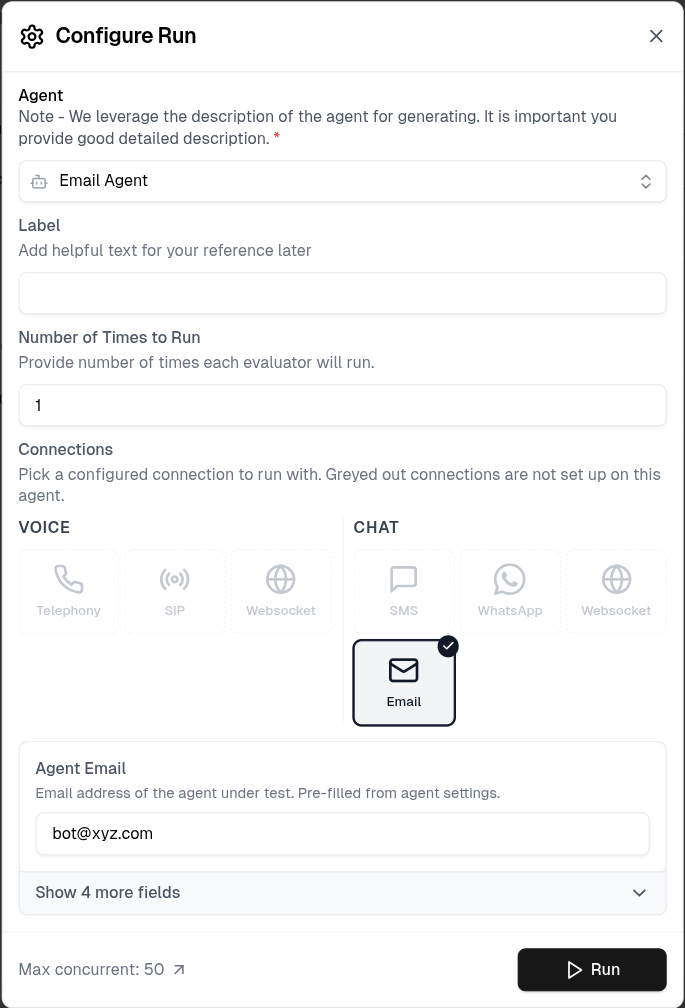 Click **Run**. For outbound agents, the dialog shows the inbound address to forward to your agent so it knows where to reply.
## Inbound vs Outbound
| Mode | When to use | Who sends first |
| -------------------------------------- | ------------------------------------- | --------------------------------------- |
| **Inbound** (`agent.inbound = true`) | Your agent receives emails from users | Cekura emails your agent |
| **Outbound** (`agent.inbound = false`) | Your agent initiates outreach | Your agent emails Cekura's test address |
For outbound agents, the run response includes an `inbound_email` address (e.g. `run-123@veliitroee.resend.app`). Configure your agent to email this address to trigger the conversation.
## How It Works
1. **Cekura sends the first email** (inbound mode) to your agent's address using the evaluator's first message
2. **Your agent replies** to the test address embedded in the reply-to header
3. **Cekura receives the reply** via inbound webhook, strips quoted history, and generates the next testing message
4. The loop continues until the conversation ends naturally or the timeout is reached (10 minutes per reply)
Email replies are threaded correctly — your agent's inbox shows a single conversation, not separate emails.
## Tool Support
| Tool | Available |
| ------------------------- | --------- |
| End Call | ✅ |
| End Call Only on Transfer | ✅ |
## Timeouts
If no reply arrives within 10 minutes, the run ends with `email-timeout`. This is intentional — email is asynchronous and slower than SMS or voice.
## API Reference
`POST /test_framework/v1/scenarios/run_scenarios_email/`
***
## Next Steps
* [WhatsApp Testing](/documentation/guides/testing-agents/whatsapp-testing) — text-based testing via WhatsApp
* [Test Profiles](/documentation/key-concepts/evaluators/test-profile) — inject user identity into email conversations
* [Custom Metrics](/documentation/key-concepts/metrics/custom-metrics) — validate reply content and tone
Click **Run**. For outbound agents, the dialog shows the inbound address to forward to your agent so it knows where to reply.
## Inbound vs Outbound
| Mode | When to use | Who sends first |
| -------------------------------------- | ------------------------------------- | --------------------------------------- |
| **Inbound** (`agent.inbound = true`) | Your agent receives emails from users | Cekura emails your agent |
| **Outbound** (`agent.inbound = false`) | Your agent initiates outreach | Your agent emails Cekura's test address |
For outbound agents, the run response includes an `inbound_email` address (e.g. `run-123@veliitroee.resend.app`). Configure your agent to email this address to trigger the conversation.
## How It Works
1. **Cekura sends the first email** (inbound mode) to your agent's address using the evaluator's first message
2. **Your agent replies** to the test address embedded in the reply-to header
3. **Cekura receives the reply** via inbound webhook, strips quoted history, and generates the next testing message
4. The loop continues until the conversation ends naturally or the timeout is reached (10 minutes per reply)
Email replies are threaded correctly — your agent's inbox shows a single conversation, not separate emails.
## Tool Support
| Tool | Available |
| ------------------------- | --------- |
| End Call | ✅ |
| End Call Only on Transfer | ✅ |
## Timeouts
If no reply arrives within 10 minutes, the run ends with `email-timeout`. This is intentional — email is asynchronous and slower than SMS or voice.
## API Reference
`POST /test_framework/v1/scenarios/run_scenarios_email/`
***
## Next Steps
* [WhatsApp Testing](/documentation/guides/testing-agents/whatsapp-testing) — text-based testing via WhatsApp
* [Test Profiles](/documentation/key-concepts/evaluators/test-profile) — inject user identity into email conversations
* [Custom Metrics](/documentation/key-concepts/metrics/custom-metrics) — validate reply content and tone